Tampilkan postingan dengan label captions. Tampilkan semua postingan

Selasa, 28 Februari 2012

Captions for all: more options for your viewing and reading pleasure

Since we first announced caption support in 2006, YouTube creators have uploaded more than 1.6 million videos with captions, growing steadily each year. We’ve also enabled automatic captions for 135 million videos, more than tripling the number of captioned videos available since July 2011. YouTube and Google’s video accessibility team have been hard at work, and we wanted to let you know about some of our progress over the past few months:

For YouTube viewers

More languages: We now support automatic captions and transcript synchronization in Japanese, Korean, and English. Speech recognition for those languages makes it easier for video owners to create captions from a plain transcript. Video owners can also add captions and subtitles in 155 supported languages and dialects, from Afar to Zulu. In Movies and Shows, you can even find out which subtitle languages are available before deciding to rent.


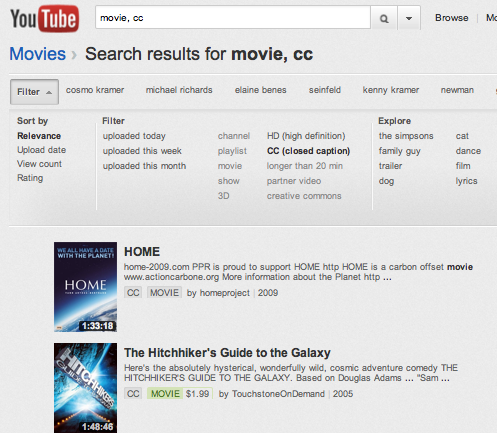
Search for videos with captions: Looking for that great quote from a video on YouTube? Add ", cc" to any search, or after searching, click Filter > CC to only see results with closed captions.

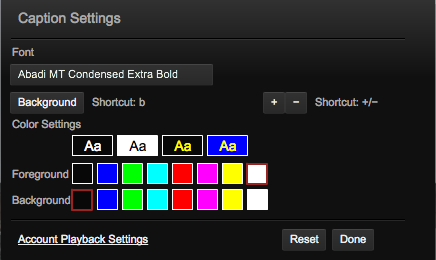
Caption settings: While watching a video, you can change the way the captions look by clicking on the “CC” icon and then the “Settings...” menu item. This includes changing the font size or colors used, and we’re planning to make this available on other platforms and add more options soon.

Broadcast caption support: If the channel owner provides a video caption file in a broadcast format, we now support its position and style information, just like you’d see on TV. This means the text can appear near the character who is speaking, italicized to indicate an off-camera narrator, or even scrolling if the original captions were generated in a real-time mode. Check out this little demo from CPC to see how it looks, or even watch a rental movie with captions like those available from The Walt Disney Studios.

For YouTube creators

More supported formats: YouTube now supports many of the common caption formats used by broadcasters, such as .SCC, .CAP, EBU-STL, and others. If you have closed captions that you created for TV or DVDs, we'll handle the conversion for you.

MPEG-2 caption import: If you upload an MPEG-2 video file that contains closed captions with CEA-608 encoding, we'll import the captions along with the video and create YouTube captions. For example, the nonprofit organization Public.Resource.Org recently added thousands of public domain videos with closed captions to YouTube, coming from government agencies like the National Archives. Here’s some insight from Carl Malamud, President, Public.Resource.Org:
Many of the DVDs and VHS tapes lying around in our vaults and attics--particularly those that were produced by governments and others that care about accessibility of their videos--already have Closed Captions embedded in them. Pulling that information out automatically and making it visible on YouTube means that these videos will continue to be accessible to new generations of viewers.


Along with the millions of people like myself who rely on captions and subtitles, we were very encouraged when the Federal Communications Commission published rules governing closed captioning requirements for video on the web, whether that’s to your computer, tablet, phone or other device. We hope these new regulations will drive captions closer to becoming ubiquitous for video everywhere, and in the meantime we’ll keep developing more ways for you to enjoy all the great channels on YouTube.

Ken Harrenstien, software engineer, recently rented “Cars 2” and was ecstatic to see its awesome captions.

Jumat, 19 November 2010

Happy Birthday Automatic Captions! Celebrate with more videos and higher quality

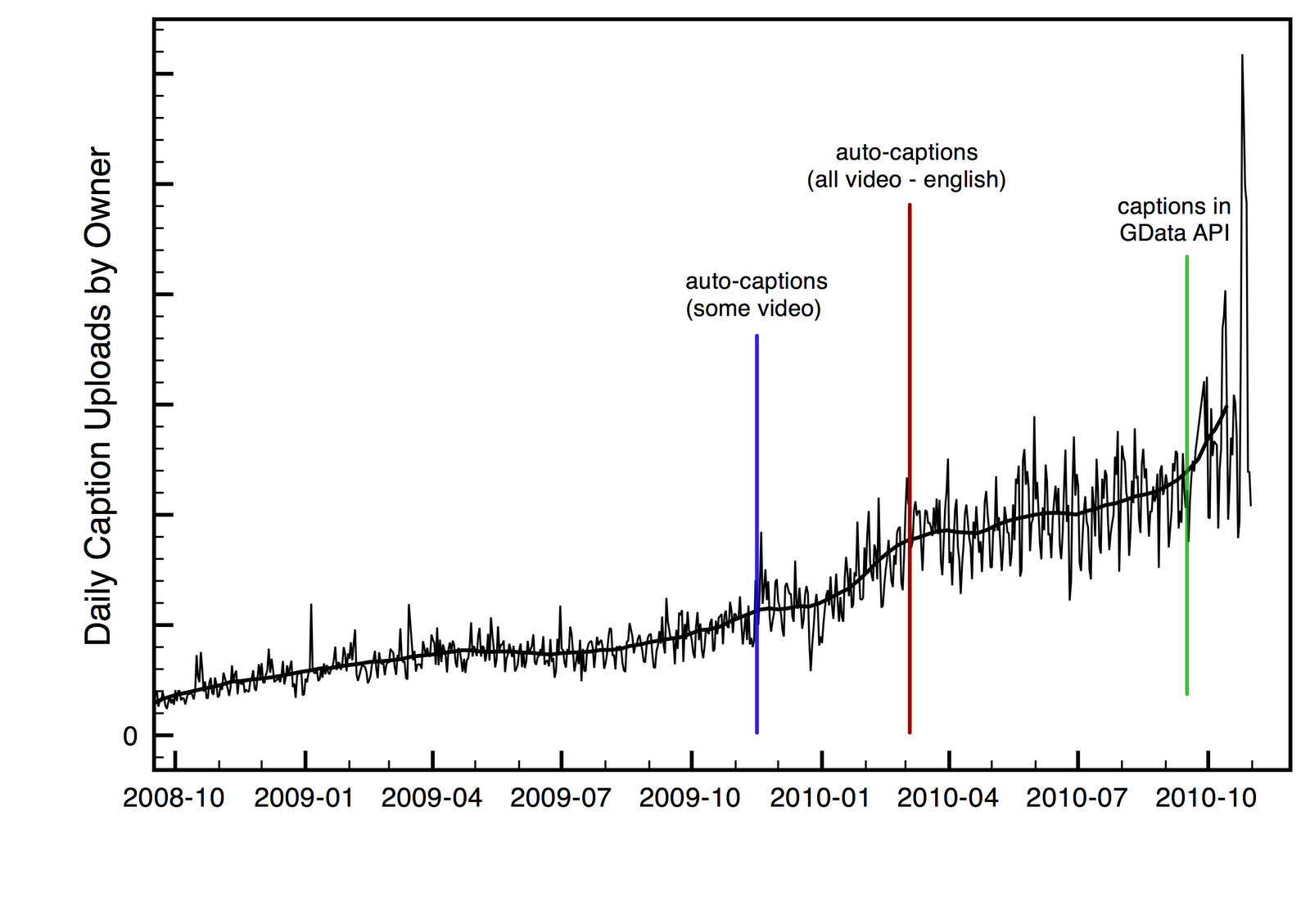
Today marks exactly one year since we launched automatic captions. We started with just a few partner channels in November 2009, and soon after turned on auto-captions for everyone. As we explained back then, we like to launch early and iterate, and this year we’ve been making steady progress to expand the quantity and quality of captioned video online. It’s been truly gratifying to see how far we’ve come.

Here’s the quick summary:
  • People have watched video with automatic captions more than 23 million times, and have automatically translated captions more than 7.6 million times.
  • The number of manually-created caption tracks has more than tripled thanks largely to automatic caption timing technology.
  • Just recently, we’ve reduced the error rate in our speech recognition algorithms by 20%

Back in November we talked about how online video presents a tremendous challenge of scale. Before automatic captions, there were around 200,000 videos on YouTube with captions. It sounds like a lot, but at YouTube more than 35 hours of video is uploaded every minute. We want all videos to be accessible to everyone -- whether or not they can hear or understand the language.

Since March, people have been able to get captions for almost any video that has clearly spoken English. Less than a year later people have watched video with automatic captions more than 23 million times. Clearly, there’s a lot of demand for captioned content, and people have been really making use of our technology. They’re also using the technology to access content in their own languages, since captions can be automatically translated to more than fifty languages; we’ve seen more than 7.6 million caption translations.

Auto-captions aren’t perfect, so we’ve also been pursuing a number of initiatives to help people manually create captions. At our event a year ago, we introduced automatic caption timing, a feature that will take an ordinary text file and turn it into captions with time-codes. Since then we’ve added these features to the YouTube Data API to make it easier for people to write scripts and apps that can upload large numbers of captions at once. More recently, we started the YouTube Ready qualification program to help video owners find professional caption vendors familiar with YouTube. Thanks to these efforts, we’ve seen the number of manually-created caption tracks available on YouTube more than triple (with more than 500,000 available today).

When it comes to captions, we care not just about quantity, but also quality. Here again we have good news: just like a real one-year old, YouTube has been learning many new words! For example, we now recognize the word "smartphone" (turn on speech recognition to see). =)

In the past few weeks, we’ve rolled out a significant improvements to our speech recognition technology to improve the accuracy of automatic captions. YouTube's new speech recognition model reduces the overall word error rate by about 20%. Although the improvements vary from video to video, a video that had identified 50% of the words correctly before will now recognize about 60% of the words, and a video that was at 75% before will now correctly identify about 80% of the words. We continue to make improvements and there is much more on the way.

On a personal note, it's been amazing to see the feedback, videos, blog posts, thanks, (and bug reports!) sent in over the past year. Even though we can't possibly respond to them all, we love to see them, and they shape our efforts on this project. We’ve taken this feedback to make a number of subtle improvements to the service, such as adding an “Always show automatic captions” setting, adding an interactive transcript button so you can see all the captions and skip through the video, and making the red CC button easier to find.

What's next? We’ll continue to work on accuracy, and we also want to make sure captions are available on YouTube everywhere, on your Internet TV, your computer and your mobile phone. We have a few other things coming... but I don't want to spoil the surprise. You'll have to stay tuned, and I hope you'll turn the captions on when you do!

Ken Harrenstien, Caption Jedi, recently watched "Sign Language from the Space Station"

Senin, 19 Juli 2010

YouTube answers your questions about “YouTube Worldwide”; next topic is advertising

“YouTube Answers” is a series we began in April to introduce you to a variety of people who work here and give you the chance to ask us questions about a broad topic relevant to the site. Camille Hearst and Shenaz Zack bravely went first, to answer your questions about partnerships. Next, we recruited Brian Truong, Product Manager; Shalabh Chaturvedi, Software Engineer, and Victoria Grand, Head of Policy, to tackle your queries about our international sites and policies:


Big thanks to everyone who asked a question! We saw a three-fold increase in questions and votes this round.

Next up: head over to the YouTube channel where we’re using Moderator to collect questions on the topic of “Advertising on YouTube.” This is a good opportunity to ask about how advertising on YouTube works, what the different ad formats are, what advertisers are looking for, and ways you might be able to connect with them. We’ll be taking questions until Monday, July 26, and then we’ll be back as soon as possible afterward with two new staffers in the hot seat.

Mia Quagliarello, Product Marketing Manager, Community, recently watched “Yosemitebear Mountain Giant Double Rainbow 1-8-10.”

Jumat, 02 Juli 2010

Release Notes: processing status, share to Buzz, and more

Before we head into the holiday weekend, wanted to update you on a couple of things that went down in sunny San Bruno recently:

Processing progress status: Those of you who upload know that there's a short period of time between uploading a video and it being visible on the site. The new processing percentage under the video preview lets you know when your video is ready for the world to see.

AutoShare to Buzz: Over four million people are already AutoSharing to Facebook, Twitter, Orkut or Google Reader, and now you can automatically share your YouTube likes, favorites, comments, subscriptions and uploads to your Buzz network, too. You can still keep YouTube as a connected site in Buzz if you hooked it up previously, but that only automatically posts your uploads for now. For more about AutoShare, click here.

Results badging: Our search results page has had a light makeover. Instead of bold headers separating channels, videos and playlist results, we've introduced new, compact badges to more clearly indicate the content type, as so:

New captions feature: The interactive captions viewer allows people to read ahead in the caption stream and jump to a specific segment within a video with captions. Captions are a key part of making YouTube accessible to all.


Have a great one!

The YouTube Team

Rabu, 30 Juni 2010

Professional caption services get “YouTube Ready”

Captioning is becoming increasingly important to YouTube and videos all across the web. Captions ensure that many more people can understand what's happening in your video, from deaf and hard of hearing viewers to people who speak a different language from you and choose to auto-translate the captions into their language. Captions also make your video a lot more discoverable. People searching for content on YouTube might encounter your video if your captions contain the words or subjects they're looking for.

You may be able to manage creating captions for your videos on your own, but sometimes you have too many videos or your video has elements that need special care. Today, thanks to support from the Described and Captioned Media Program (DCMP.org), we're pleased to roll out a new "YouTube Ready" designation for professional caption vendors in the United States. The YouTube Ready logo identifies qualified vendors who can help you caption your YouTube videos.


If you're interested in having your videos captioned, here's DCMP's current list of YouTube Ready vendors who may be able to help. Please keep in mind that participating vendors:
  • Have passed a caption quality evaluation administered by the DCMP
  • Have a website and a YouTube channel where you can learn more about their services (see playlist below)
  • Have agreed to post rates for the range of services that they offer for YouTube content. Typical rates range from $2/minute for a transcript to $10/minute for full professional captions.
The first launch of the program includes 12 qualified vendors, with more to come. We're happy to have them on board, and hope they'll help to provide even more options for captioning your videos. If you're interested in finding a YouTube Ready caption vendor, check out our Help Center or visit DCMP's page.


Naomi Bilodeau, Caption Evangelist, recently watched "Deaf Mugger."

Rabu, 16 Juni 2010

Art Imitates Life: Re-enacting Prop 8 Trial on YouTube

In its January 13, 2010, ruling, the U.S. Supreme Court blocked the public broadcast of the proceedings in Perry v. Schwarzenegger, a U.S. District Court case challenging the constitutional validity of California's Proposition 8 ban on same-sex marriage. Not to be deterred, producers John Ainsworth and John Ireland from MarriageTrial.com took verbatim court transcripts and first-hand accounts from bloggers present at the trial to film complete re-enactments of the proceedings for their YouTube channel. With closing arguments slated for June 16, we caught up with the producers to learn more about the project.

What is the inspiration behind MarriageTrial on YouTube?
We realized on January 13, when the U.S. Supreme Court blocked the broadcast of California’s Proposition 8 trial, that this was really significant. When the American public was actively prevented from accessing these public proceedings on YouTube — precisely because it is so accessible — well, that’s a flat-out dare. We had to fill the void. We both believe that citizens should have access to the judicial process that will likely determine the future of marriage equality for our entire country.

First video in the series:


How has YouTube helped meet the goals of your project?

There is really no better venue for 60+ hours of film. Many blogs and news media websites have embedded our videos. Because of this, our coverage has become an integral part of the media’s reporting on the trial. Ultimately, this serves our primary goal, which is to bring transparency to the court process.

We have followed behind the scenes of the trial, as well. When the Defendant-Intervenors filed Motions to Strike testimony, we were able to “red-line” the proposed strikes, guiding people to the excerpts the motion sought to exclude from the official record. In fact, our re-enactment will remain accessible, regardless of what may be redacted from the official transcript. That is an extraordinary victory for transparency in our judicial process.

YouTube’s “time seek” functionality allows us to link evidence that is introduced in the trial. Most of our viewers are active consumers of the information, many of them reading along with the transcripts and searching for further references to each witness’s testimony. Yet many others just run the videos in the background. One of our subscribers, who cranks up her speakers and cleans the house, told us she considers our channel better than the books on tape.

Has the amount of attention been a surprise?

We were astonished at the press coverage we received, from local and national media. The international press, too, took a great interest in our project. The fact that they could access our video on YouTube made it very easy to cover and most TV and radio outlets broadcast clips directly from our YouTube channel. In a way, our YouTube Channel served as an Electronic Press Kit (EPK), which saved us quite a bit of time and marketing money.

We were featured in the New York Times, then on Bill Moyers Journal on PBS. Other national and international coverage followed. These reports commented on the way we were getting this video out to the masses…that our effort signifies a new type of “citizen journalism,” not only accessible to the world, but faster and cheaper to produce than traditional forms of media broadcast.

Describe the use of captions in your videos.

A few hours after we uploaded our first chapters, automatic captions miraculously appeared! We then formatted the official court transcripts and used YouTube’s auto-alignment tool to produce accurate captions. Our actors followed the transcripts word-for-word and the captions make it clear what a great job they did. It was so easy to provide captions, which, traditionally, can be very expensive (often prohibitively) for filmmakers. The new Interactive Transcript feature is a great way for users quickly jump to specific parts of the video directly from the transcript.

Comprehension and retention of the concepts introduced by witnesses, for example, get a major boost when viewers can read along, without having to pull up the PDF transcript. And of course, the trial re-enactment is immediately available to people with hearing loss, as well as people whose native languages are not English. The auto-translate function makes these captions available in so many languages. We could never have even approached this level of accessibility as independent filmmakers.

If the ruling goes into appeals, will you continue with the re-enactments?

Yes. We plan to follow Perry v. Schwarzenegger to the U.S. Supreme Court. According to most experts, this court’s ruling will be appealed to the U.S. Ninth Circuit, regardless of whether it repeals or confirms California’s Proposition 8. From there, it will inevitably be appealed to the highest court. We expect the first appeal within six months or so, then for it to go to Washington, D.C. by next fall. We are already planning for those re-enactments. It’s a bit early to cast the Supreme Court justices just yet, but we know that is in our future.

Bottom line, this case as a landmark in America’s civil rights history. We are proud to have created this permanent record as a resource for generations to come. Its ultimate impact is tied to YouTube as an integral part in our country’s political and cultural tapestry.

Interview by Obadiah Greenberg, Strategic Partnerships, who recently watched “NASA Team Captures Haybusa Spacecraft Reentry.”

Selasa, 06 April 2010

Marlee Matlin’s new YouTube show and visit to Google

“The real handicap of deafness lies not in the ear; it lies in the mind.” - Marlee Matlin, March 30 talk at Google

I never expected that working at Google would allow me to meet a cherished idol, Marlee Matlin. Marlee’s acting prowess couldn’t help me with my work as a software engineer, yet we faced a common challenge: being Deaf in a hearing world. Like many other people, I was inspired by the way she succeeded on her own terms.

That’s why it was such an honor for me personally to have Marlee visit Google to discuss online captioning and deliver a talk to employees. As you may know, Marlee is an Academy Award winning actress, author and a national spokesperson for closed captioning access on behalf of the National Association for the Deaf (NAD) and other organizations. She talked about her autobiography, I’ll Scream Later, and accessibility issues facing people who are Deaf or hard of hearing. In addition, she shared a preview of a pilot for her new reality show on YouTube, “My Deaf Family.” We’ve published Marlee’s talk (with captions, of course!) and encourage you to check it out:


Marlee said she chose to publish her show on YouTube, “where I can call the shots and where I can guarantee the show will be broadcast with captions.” Since posting online, she’s already gotten more than 70,000 views and some great feedback and ratings. People from all around the world are checking out the show and sharing with friends. Take a look at the views rising recently:


As we discussed with Marlee and at our event last November, the online population of people who are Deaf or hard of hearing rivals the populations of people speaking many major world languages, such as Italian and Russian. Adding captions to video can help ensure the widest audience possible sees it, and with machine translation, that audience can expand to include people who speak any of 50 languages.

While expanding automatic captions to all users was an important step, we still encourage you to add manual captions to your videos. With our automatic-timing technology it’s easy, and manual captions are generally more accurate. We showed Marlee how to add captions to her new show in just a few minutes -- right before she got up on stage for the premiere.

We want to thank Marlee for taking the time to visit us, and for sharing her talent and vision with the broader YouTube community. We wish her the best of luck with her new show, and look forward to working together to expand online access. Personally, I’m still pinching myself after the visit; it’s not everyday that I get a compliment from a person like Marlee.

Ken Harrenstien, Software Engineer, recently watched “Jason Molenda In the Net.”

Senin, 08 Maret 2010

Iraqi Voices: Voter Perspectives on Election Day

On Sunday, despite as many as 100 bomb blasts throughout the country, according to news reports, Iraqi citizens flocked to the polls in higher-than-expected numbers to vote in the first nationwide parliamentary election since 2005. Amidst 38 confirmed casualties, Iraqi citizens from 18 different provinces inside Iraq -- as well as 16 other countries around the world -- cast their ballots to determine who will fill the Prime Minister's office and 325 seats in the nation's parliament.

What is it like to be an Iraqi citizen during this important and volatile time in the nation's history? We partnered with Al Jazeera English to find out, by collecting opinions directly from Iraqi voters on video in our "Iraqi Voices" project. The footage is still coming in as the votes are counted, but you can go to Al-Jazeera's YouTube Channel to see the playlist of content uploaded to YouTube so far. (If you'd like to put things in perspective, you can compare these clips to the ones we collected from American voters during the 2008 election in our Video Your Vote platform with PBS.)

One Iraqi got to the polls at 5 a.m. only to find out that his name was not on the list:


This video documents the actual voting experience in Iraq:


And this woman explains why she will not vote in this year's election:


If you're from Iraq or have thoughts about the Iraqi elections, upload your videos to the Al-Jazeera website (http://interactive.aljazeera.net/iraqelections) using YouTube Direct and your video might be shown on television.

Olivia Ma, News & Politics Manager, recently watched "التصويت الخاص للجيش (محمد الصالح" (with subtitles)

Kamis, 04 Maret 2010

The Future Will Be Captioned: Improving Accessibility on YouTube

Tens of millions of people in the U.S. experience some kind of hearing impairment and recent studies have predicted that over 700 million people worldwide will suffer from hearing impairment by 2015. To address a clear need, the broadcast industry began running captions on regular video programming in the early 1970s. Today, closed captions on video are more prevalent than ever. But generating captions today can be a time-consuming and complicated process.

Making video easily accessible is something we're working hard to address at YouTube. One of the first steps we took was the development of a caption feature in 2008. In November of last year we released auto-captioning for a small, select group of partners. Auto-captioning combines some of the speech-to-text algorithms found in Google's Voice Search to automatically generate video captions when requested by a viewer. The video owner can also download the auto-generated captions, improve them, and upload the new version. Viewers can even choose an option to translate those captions into any one of 50 different languages -- all in just a couple of clicks.

Today, we are opening up auto-captions to all YouTube users. There will even be a "request processing" button for un-captioned videos that any video owner can click on if they want to speed up the availability of auto-captions. It will take some time to process all the available video, so here are some things to keep in mind:
  • While we plan to broaden the feature to include more languages in the months to come, currently, auto-captioning is only for videos where English is spoken.
  • Just like any speech recognition application, auto-captions require a clearly spoken audio track. Videos with background noise or a muffled voice can't be auto-captioned. President Obama's speech on the recent Chilean Earthquake is a good example of the kind of audio that works for auto-captions.
  • Auto-captions aren't perfect and just like any other transcription, the owner of the video needs to check to make sure they're accurate. In other cases, the audio file may not be good enough to generate auto-captions. But please be patient -- our speech recognition technology gets better every day.
  • Auto-captions should be available to everyone who's interested in using them. We're also working to provide auto-captions for all past user uploads that fit the above mentioned requirements. If you're having trouble enabling them for your video, please visit our Help Center: this article is for uploaders and this article is for viewers.
For content owners, the power of auto-captioning is significant. With just a few quick clicks your videos can be accessed by a whole new global audience. And captions can make is easier for users to discover content on YouTube.

Twenty hours of video is uploaded to YouTube every minute. Making some of these videos more accessible to people who have hearing disabilities or who speak different languages, not only represents a significant advancement in the democratization of information, it can also help foster greater collaboration and understanding.


Hiroto Tokusei, Product Manager, recently watched "How to Eat Stick Candy Fast."

Sabtu, 13 Februari 2010

500 Videos from Davos Now With Captions

You may have recently seen all of the videos uploaded for the 2010 YouTube Davos Debates. Because the audience for these videos is truly global, we want to make them accessible and available to as many people as possible. We've now added captions for over 500 videos from The Davos Debates. Try a Google search for captioned video on thedavosquestion to see some of the results.

To turn on captions, hover over the arrow-shaped icon in the lower right corner of the YouTube player and click the caption button. Captions on The Davos Debates videos can also be automatically translated right in YouTube: choose "Translate Captions" from the caption menu to try machine translation to 50 different languages.

You can learn more about captions and subtitles here.

Naomi Bilodeau, YouTube Captions team, recently watched, "The YouTube Davos Debate: "Redesigning an Important Cause."

Kamis, 31 Desember 2009

YouTube's Top 10 Launches of 2009

Did you know that we released more features in 2009 than in 2007 and 2008 combined? This made it the busiest year on record for the YouTube product and engineering teams. Some of these launches, like support for 1080p, made sizable splashes, while others, like "trending topics" appearing at the bottom of the browse page,went out with less fanfare. With so much going on, we wanted to pause before the new year begins to review the things that hopefully made the biggest impact on your overall YouTube experience:

  • Auto-Share - As part of our wider effort to integrate YouTube into the social and communication platforms you use every day, AutoShare automatically syndicates your YouTube activity to Facebook, Twitter and Google Reader.

  • 1080p - In November, we unveiled support for videos in 1080p (aka "full HD"). Want to test it out? Check out this video.

  • Auto-Speech Recognition - Google's automatic speech recognition (ASR) technology, coupled with YouTube's captioning system, makes videos more accessible to the deaf and hearing impaired. This same speech recognition technology can create machine-generated captions, which can then be translated into 51 languages.
  • Mobile Website for Smartphones - Watching videos on -- and uploading videos from -- cell phones is more popular than ever. To meet this demand, we launched a new mobile website designed to make using YouTube on smartphones like the iPhone, G1 and Palm Pre a lot easier.
  • YouTube XL - YouTube XLoptimizes YouTube for large screens. In addition to offering larger text and simplified navigation, XL has a continuous play feature, allowing you to search for a topic, hit "play" and then kick back for an uninterrupted viewing experience.
  • VEVO - VEVO.comis a partnership that blends Google and YouTube's technology with music videos from a broad catalog of artists from Universal Music Group, Sony Music and EMI. The site hopes to redefine the way people watch and engage with music online, as well as change the way the digital and music industries do business with each other.

  • Feather - Featheris a stripped-down version of the page on which any video plays. Without all but the basic features, the page loads more quickly and videos play back faster. Give it a whirl in TestTube or click here.

  • 3D - In July, one of our engineers used his free time to implement easier viewing options for 3D videos on YouTube. Here's a brief overview video.
  • Real-Time Comment Search - In October, we released the ability to search YouTube comments in real-time. The comment appears on a continuously updated results page, and "trending topics" indicates the hottest topics of conversation on YouTube at that particular moment.
  • Shows & Movies - In April, we rolled out a destination sporting hundreds of movies and thousands of full-length TV episodes. Offerings have included film classics like Taxi Driver, Ghostbusters and the Spaghetti Western Trilogy, as well as current TV shows from broadcasters like C4 and Channel 5 in the UK.
Which of these features is your favorite? Please use the poll in the top right corner of this blog to let us know what you've found to be most useful in '09, or leave a comment below if there's another feature that had an important impact on your YouTube life.

Hunter Walk, Director, Product Management, and John Harding, Engineering Manager

Kamis, 19 November 2009

Innovation in accessibility

Creating captions for your videos on YouTube becomes much easier today, thanks to automatic speech recognition (ASR) technology.

Auto-Timing:
Upload a transcript (a simple file with the text of what's said in the video), and through speech recognition technology we'll turn it into synchronized captions. Timing is the toughest part of creating captions, but now this should be much easier. The technology works best for videos with good sound quality and clear spoken English.

Auto-Captions: We use the same speech recognition technology to create machine-generated captions (which can then be translated into 51 languages). You can see auto-caps in action right now on a range of educational channels, such as UC Berkeley, Stanford, MIT, Yale, UCLA, Duke, UCTV, Columbia, PBS, National Geographic, Demand Media, UNSW and most Google channels, including YouTube's. Click on the menu button at the bottom right of the video player, then click CC and the arrow to its left, then click the new "Transcribe Audio" button. In time, we hope to expand this feature for many more YouTube videos.

Auto-caps is a continued step towards YouTube's goal of making video accessible everywhere (web, mobile, TV) and to everyone (other countries, languages, alternative access modes). It's also an example of using technology to enhance the video experience. For more details, please check this post on the Google Blog.

To learn more about how to use auto-caps and auto-timing, check out our help center article and this short video:


Hiroto Tokusei, Senior Product Manager, recently watched "
(HD) 夜のゆりかもめ(新橋→豊洲) 01."

Update (11/29): On November 24, we posted a full-length video of this feature's announcement event in Washington, D.C. We have included English captions using the new auto-timing capabilities: