Many of the YouTube videos you watch and love are also shared on sites beyond YouTube.com. Our site is built, in part, on social tools like comments, video responses and ratings. In recent years we’ve worked to integrate these social signals across other popular social platforms. For example, we see more than 400 tweets per minute containing a YouTube link, and over 150 years worth of YouTube video is watched on Facebook every day.
We've always believed that there are great conversations happening all the time off of YouTube.com, and that commentary has the potential to enrich your experience when watching and discovering video on YouTube itself. So today we're excited to announce we’ve acquired Fflick, a talented team that analyzes social media data to surface great content and the discussions around it.
We were impressed by the technical talent, design instincts and entrepreneurial spirit of the Fflick team. As part of YouTube, the Fflick team will help us build features to connect you with the great videos talked about all over the web, and surface the best of those conversations for you to participate in.
We look forward to rolling out more features that help you enjoy and discover new videos to watch, so stay tuned!
Shiva Rajaraman, Group Product Manager, recently discovered “Stjepan Hauser and Luka Sulic - Smooth Criminal” on Twitter.
Tampilkan postingan dengan label social networks. Tampilkan semua postingan
Tampilkan postingan dengan label social networks. Tampilkan semua postingan
Rabu, 26 Januari 2011

Rabu, 27 Oktober 2010
On the Rise: Pick which YouTube upstart goes on the homepage
More and more of our YouTube partners are hitting subscriber numbers in the 100,000s and even in the 1,000,000s. We want to help more of you to get to those kind of subscriber numbers, which is why we’re starting a new monthly feature called “On the Rise.”
Here’s how it works: every month, we’ll pull together a list of partner channels whose subscriber rate has quickly accelerated in the last 30 days but who still have less than 100,000 subscribers. We’ll winnow that list down to a handful of channels, and then we’ll ask the community to vote on one channel to be featured on the YouTube homepage and get promoted through our social media channels on Twitter and Facebook.
So, here are the four channels vying for the inaugural spotlight, in alphabetical order:
emilynoel83 is Emily Eddington, a 26-year-old morning news anchor whose channel is devoted to all things beauty, particularly fun ideas for TV news makeup.
golf says it all: this channel consists of golf videos, tips and lessons, aggregated from Tour Links Putting Greens, BunkerShot.com, NationalSchoolForms.com and Show Me the Golf.
kalebnation, a 22-year-old vlogger who says he enjoys “wild rumpuses.”
optibotimus is “just a simple guy” that does toy reviews. “I typically stick to what I grew up loving,” he writes on his channel. “Transformers, mostly.”
You’ve got one week, until the end of the day on November 2, to vote for your favorite in the top right corner of this blog. We plan to showcase the winner on our homepage on November 6. You can also nominate yourself or your friends for next month’s feature in the comments section of this blog post (though please note: comments are moderated due to spam).
Mia Quagliarello, Product Marketing Manager, recently watched “The Giants Win The Pennant!”
Here’s how it works: every month, we’ll pull together a list of partner channels whose subscriber rate has quickly accelerated in the last 30 days but who still have less than 100,000 subscribers. We’ll winnow that list down to a handful of channels, and then we’ll ask the community to vote on one channel to be featured on the YouTube homepage and get promoted through our social media channels on Twitter and Facebook.
So, here are the four channels vying for the inaugural spotlight, in alphabetical order:
emilynoel83 is Emily Eddington, a 26-year-old morning news anchor whose channel is devoted to all things beauty, particularly fun ideas for TV news makeup.
golf says it all: this channel consists of golf videos, tips and lessons, aggregated from Tour Links Putting Greens, BunkerShot.com, NationalSchoolForms.com and Show Me the Golf.
kalebnation, a 22-year-old vlogger who says he enjoys “wild rumpuses.”
optibotimus is “just a simple guy” that does toy reviews. “I typically stick to what I grew up loving,” he writes on his channel. “Transformers, mostly.”
You’ve got one week, until the end of the day on November 2, to vote for your favorite in the top right corner of this blog. We plan to showcase the winner on our homepage on November 6. You can also nominate yourself or your friends for next month’s feature in the comments section of this blog post (though please note: comments are moderated due to spam).
Mia Quagliarello, Product Marketing Manager, recently watched “The Giants Win The Pennant!”
Jumat, 06 Agustus 2010
Release Notes: Playlist Bar, music listings, annotations upgrades...
What's new on YouTube since we last met? Let us count the things...
"Playlist Bar" launch: Last week, we introduced the "Playlist Bar": when you view a playlist, recommended videos (from the homepage), your subscriptions or your favorites, you'll see a control bar at the bottom of the page, displaying the videos from those categories. The goal is to keep you from having to jumping back and forth to different pages to select which videos you'd like to watch next. Autoplay (which is no longer on by default) and the ability to select specific videos from your playlists without ever leaving the page are intended to make your viewing experience more seamless. We're continuing to monitor your feedback here as we plan improvements to this feature.
Local music listings: A new addition to our revamped music page is the "Events Near You" section, provided by Songkick. Discover an artist you like on the page? "Events Near You" will let you know if he or she is headed your way.

Annotations upgrades: We now offer fully transparent annotations with black or white text, a new default color (half-transparent black, replacing red), a new default position for new annotations (off-center), and a cleaner look for tooltips.
Redesigned video manager: The My_Videos page has been reworked to offer streamlined ways of managing and reviewing videos you've uploaded, including options to sort your videos alphabetically, by length, by recency and by views. You can also browse the content you've viewed, purchased and liked, and there's access right here to Insight and Promoted Videos information (to the right of "Edit" button). For feedback on these changes, please chime in here.
Promotional badges: Take a look at the badges created to help you better promote your YouTube channel on site and off. Find the asset you like and click on it to generate handy embed code for your blog or website (you'll have to sign in at the prompt).
 New way to embed videos: A new embed code style enables you to view embedded videos in one of our Flash or HTML5 players, depending on your viewing environment and preferences. For more information, see this blog post from our API blog.
Buzz videos on your homepage: As with the Facebook feed import, the YouTube videos your friends are sharing on Google Buzz are now be pulled into your YouTube homepage if you're connected to Buzz (e.g. to AutoShare your activity).
HQ Webcam uploads: That's right: You can now upload high quality video from your Webcam! All webcam recordings will be done at 360p.
Free previews on rentals: All rental videos in the U.S. will show a free preview or movie trailer automatically so you can decide if you want to watch it before buying it. If you're over 18 and live in the U.S., you can check this out right here on the movie Kick-Ass.
The YouTube Team
"Playlist Bar" launch: Last week, we introduced the "Playlist Bar": when you view a playlist, recommended videos (from the homepage), your subscriptions or your favorites, you'll see a control bar at the bottom of the page, displaying the videos from those categories. The goal is to keep you from having to jumping back and forth to different pages to select which videos you'd like to watch next. Autoplay (which is no longer on by default) and the ability to select specific videos from your playlists without ever leaving the page are intended to make your viewing experience more seamless. We're continuing to monitor your feedback here as we plan improvements to this feature.
Local music listings: A new addition to our revamped music page is the "Events Near You" section, provided by Songkick. Discover an artist you like on the page? "Events Near You" will let you know if he or she is headed your way.

Annotations upgrades: We now offer fully transparent annotations with black or white text, a new default color (half-transparent black, replacing red), a new default position for new annotations (off-center), and a cleaner look for tooltips.
Redesigned video manager: The My_Videos page has been reworked to offer streamlined ways of managing and reviewing videos you've uploaded, including options to sort your videos alphabetically, by length, by recency and by views. You can also browse the content you've viewed, purchased and liked, and there's access right here to Insight and Promoted Videos information (to the right of "Edit" button). For feedback on these changes, please chime in here.
Promotional badges: Take a look at the badges created to help you better promote your YouTube channel on site and off. Find the asset you like and click on it to generate handy embed code for your blog or website (you'll have to sign in at the prompt).

Buzz videos on your homepage: As with the Facebook feed import, the YouTube videos your friends are sharing on Google Buzz are now be pulled into your YouTube homepage if you're connected to Buzz (e.g. to AutoShare your activity).
HQ Webcam uploads: That's right: You can now upload high quality video from your Webcam! All webcam recordings will be done at 360p.
Free previews on rentals: All rental videos in the U.S. will show a free preview or movie trailer automatically so you can decide if you want to watch it before buying it. If you're over 18 and live in the U.S., you can check this out right here on the movie Kick-Ass.
The YouTube Team
Selasa, 03 Agustus 2010
It’s official: YouTube is more popular than music ;)
Today our Facebook page hit an important milestone: over 10 million of you have clicked that “Like” button, making us more popular than Cristiano Ronaldo and -- whoa -- music?! Here’s a special message to anyone who’s ever clicked the thumb’s up button on our page:
Now, that’s pretty awesome, but honestly we won’t rest until we rock those vampires, sweep by the Prez and topple Lady Gaga. Help us get there by liking this page, writing on our Wall and sharing the videos and news we post daily. And, of course, a huge thanks to anyone and everyone who’s already said they "Like" us. It's most definitely mutual!
Mia Quagliarelly, Community Manager, recently posted “Jane Austen’s Fight Club” to Facebook.
Now, that’s pretty awesome, but honestly we won’t rest until we rock those vampires, sweep by the Prez and topple Lady Gaga. Help us get there by liking this page, writing on our Wall and sharing the videos and news we post daily. And, of course, a huge thanks to anyone and everyone who’s already said they "Like" us. It's most definitely mutual!
Mia Quagliarelly, Community Manager, recently posted “Jane Austen’s Fight Club” to Facebook.
Jumat, 02 Juli 2010
Release Notes: processing status, share to Buzz, and more
Before we head into the holiday weekend, wanted to update you on a couple of things that went down in sunny San Bruno recently:
Processing progress status: Those of you who upload know that there's a short period of time between uploading a video and it being visible on the site. The new processing percentage under the video preview lets you know when your video is ready for the world to see.
 AutoShare to Buzz: Over four million people are already AutoSharing to Facebook, Twitter, Orkut or Google Reader, and now you can automatically share your YouTube likes, favorites, comments, subscriptions and uploads to your Buzz network, too. You can still keep YouTube as a connected site in Buzz if you hooked it up previously, but that only automatically posts your uploads for now. For more about AutoShare, click here.
 Results badging: Our search results page has had a light makeover. Instead of bold headers separating channels, videos and playlist results, we've introduced new, compact badges to more clearly indicate the content type, as so:
 New captions feature: The interactive captions viewer allows people to read ahead in the caption stream and jump to a specific segment within a video with captions. Captions are a key part of making YouTube accessible to all.

Have a great one!
The YouTube Team
Processing progress status: Those of you who upload know that there's a short period of time between uploading a video and it being visible on the site. The new processing percentage under the video preview lets you know when your video is ready for the world to see.


Have a great one!
The YouTube Team
Rabu, 12 Mei 2010
More choice for users: unlisted videos
Melinda teaches high school in the Bay Area and recently reached out to us with a problem. Her students just finished a video history project that she wanted to share with their parents and classmates. But she was concerned about posting the videos publicly because she didn’t want the whole world to find them (frankly, neither did her students). Melinda told us YouTube’s private sharing options -- a 25-person cap that’s limited to other YouTube users -- didn’t work for her. She needed a better option to privately share her students’ talent.
Later today, we'll be rolling out a new choice that will help Melinda and other people like her: unlisted videos. [Update: Unlisted videos are now available.]
With this feature, you can mark your videos as "unlisted." This means only people who have the link to the video will be able to watch it. It won’t appear in any of YouTube’s public pages, in search results, on your personal channel or on the browse page. It’s a private video, except you don’t need a YouTube account to watch it and there is no limit to the number of people who can view it. You’ll get a link when you upload the video and then it’s up to you to decide who to share it with. Unlisted is the perfect option for that class project, video from last summer’s family reunion or your secret Broadway audition tape.
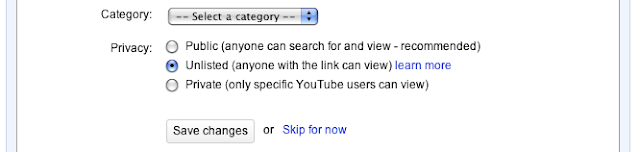
Just remember, the video can be viewed by anyone with the link, so only give it to people you trust! For more information, check out our Help Center page.
Jen Chen, Software Engineer, recently watched “8-Bit Dr. Horrible (Act 1)”
Later today, we'll be rolling out a new choice that will help Melinda and other people like her: unlisted videos. [Update: Unlisted videos are now available.]
With this feature, you can mark your videos as "unlisted." This means only people who have the link to the video will be able to watch it. It won’t appear in any of YouTube’s public pages, in search results, on your personal channel or on the browse page. It’s a private video, except you don’t need a YouTube account to watch it and there is no limit to the number of people who can view it. You’ll get a link when you upload the video and then it’s up to you to decide who to share it with. Unlisted is the perfect option for that class project, video from last summer’s family reunion or your secret Broadway audition tape.

Just remember, the video can be viewed by anyone with the link, so only give it to people you trust! For more information, check out our Help Center page.
Jen Chen, Software Engineer, recently watched “8-Bit Dr. Horrible (Act 1)”
Rabu, 31 Maret 2010
New video page launches for all users
As you may know, we're in the midst of one of the largest redesigns in YouTube's history: we're simplifying the look and functionality of the video page. That's the page you see whenever a video plays, and this redesign is about going "back to basics," focusing attention on the reason why you came to YouTube in the first place -- the video -- and all the ways you engage with content and creators.
We first unveiled the new video page two months ago and checked in four weeks later to tell you about the latest set of changes. Truth is, we've been thinking about this for a long time: what you see is the result of eight months' worth of user research, feedback and data analysis. Now, after a few more additions based on your latest feedback, we are rolling it out to 100% of YouTube users.
Here's what's new about the page:
Overall look and functionality
- It's cleaner, simpler and easier to use.
- Information about a video is now grouped together in one place and there's a consistent way to get more detail when you need it. This way, unless something's truly useful to you, it doesn't clutter up your page.
- We've cleaned up the actions bar; you'll see a streamlined presentation for sharing, flagging, and embedding controls.
Discovery
- The right-hand side of the page is devoted to the next video to watch. We're smarter about suggesting the next videos to watch based on how you found the video you're watching in the first place.
- The channel name and subscribe button are now both on top of the video. We found that you prefer having a quick peek at more videos uploaders have created before deciding whether to subscribe to their channels.
Playlists
- There's a new playlist interface, with the next video in the list appearing consistently in the top right. You can easily expand that list or skip ahead using a new next button in the player controls.
- Saving to playlists is easier, and we've made Favorites the default option.
Ratings
- We've replaced the five-star ratings system with a simpler "likes / dislikes" model and introduced a new "Videos I Liked" list.
Comments
- Comments have a new highlights view which summarizes the best discussions and celebrates when creators communicate with their audiences.
We know this is a big change, but we hope you'll find the new page to be an improvement to your YouTube experience and to be a reflection of what you've told us thus far through your usage of the site and your comments to us. We'll be gathering in a conference room at our San Bruno, CA, headquarters at 6 p.m. PT today and tomorrow, and in London at 9 a.m. GMT tomorrow, to respond in near-real-time to your comments in the forums, on this blog and on Twitter. Of course, we'll be listening at other times, too, but we wanted to make sure we were available when you might have the most questions about these changes.
Igor Kofman, Software Engineer, recently watched "Pantyraid - Beba," and Shiva Rajaraman, Product Manager, recently watched "Chat Roulette Funny Piano Improv #2."
We first unveiled the new video page two months ago and checked in four weeks later to tell you about the latest set of changes. Truth is, we've been thinking about this for a long time: what you see is the result of eight months' worth of user research, feedback and data analysis. Now, after a few more additions based on your latest feedback, we are rolling it out to 100% of YouTube users.
Here's what's new about the page:
Overall look and functionality
- It's cleaner, simpler and easier to use.
- Information about a video is now grouped together in one place and there's a consistent way to get more detail when you need it. This way, unless something's truly useful to you, it doesn't clutter up your page.
- We've cleaned up the actions bar; you'll see a streamlined presentation for sharing, flagging, and embedding controls.
Discovery
- The right-hand side of the page is devoted to the next video to watch. We're smarter about suggesting the next videos to watch based on how you found the video you're watching in the first place.
- The channel name and subscribe button are now both on top of the video. We found that you prefer having a quick peek at more videos uploaders have created before deciding whether to subscribe to their channels.
Playlists
- There's a new playlist interface, with the next video in the list appearing consistently in the top right. You can easily expand that list or skip ahead using a new next button in the player controls.
- Saving to playlists is easier, and we've made Favorites the default option.
Ratings
- We've replaced the five-star ratings system with a simpler "likes / dislikes" model and introduced a new "Videos I Liked" list.
Comments
- Comments have a new highlights view which summarizes the best discussions and celebrates when creators communicate with their audiences.
We know this is a big change, but we hope you'll find the new page to be an improvement to your YouTube experience and to be a reflection of what you've told us thus far through your usage of the site and your comments to us. We'll be gathering in a conference room at our San Bruno, CA, headquarters at 6 p.m. PT today and tomorrow, and in London at 9 a.m. GMT tomorrow, to respond in near-real-time to your comments in the forums, on this blog and on Twitter. Of course, we'll be listening at other times, too, but we wanted to make sure we were available when you might have the most questions about these changes.
Igor Kofman, Software Engineer, recently watched "Pantyraid - Beba," and Shiva Rajaraman, Product Manager, recently watched "Chat Roulette Funny Piano Improv #2."
Sabtu, 27 Maret 2010
Release notes: Facebook Connect, real-time sharing, subscriber stats
In addition to some changes to our new video page, which we reported in a separate post, here are some things that have launched recently:

Partner Program expands again: Exciting! Users in Israel and Mexico can now become members of the YouTube Partner Program (YPP). To sign up, click here.
Subscribers tab in Insight: The number of subscribers you have is an important metric for many YouTube users, as it indicates how many people love your videos so much that they want to be sure never to miss one. (Speaking of which, we commend Nigahiga, who recently hit 2 million subscribers to become YouTube's No. 1 most subscribed channel of all time. But, we digress.) Insight, YouTube's analytics tool, recently added data about the evolution of your subscriber numbers over time, broken down into new subscriptions and unsubscriptions per day. Head over to your account's Insight area to check it out.
Invitation to Facebook Connect: You've been able to connect your YouTube account to your Facebook account for a while now in order to AutoShare or to find friends to subscribe to. Less known is that the YouTube homepage can show you the YouTube videos your friends are sharing on Facebook; we've kept this under the radar while we've ramped up support. But now, when you log in to your YouTube account, you'll get a prominent invitation in the Recent Activity module (see below) to connect to Facebook, which we highly recommend that you do. In fact, we hope to integrate more social networks with YouTube going forward: knowing which videos your friends are sharing on social platforms is one of the best ways to discover those clips that you, in turn, just might feel compelled to pass along. That's how we found this gem, a lovely virtual choir.

Real-time sharing: AutoShare lets you effortlessly share videos from YouTube to Twitter, Facebook or Google Reader. What you might not have known is that until recently, it took about 10 minutes for those items to get pushed out from YouTube to these platforms. Now these actions happen instantly, in real time.
Partner Program expands again: Exciting! Users in Israel and Mexico can now become members of the YouTube Partner Program (YPP). To sign up, click here.
Subscribers tab in Insight: The number of subscribers you have is an important metric for many YouTube users, as it indicates how many people love your videos so much that they want to be sure never to miss one. (Speaking of which, we commend Nigahiga, who recently hit 2 million subscribers to become YouTube's No. 1 most subscribed channel of all time. But, we digress.) Insight, YouTube's analytics tool, recently added data about the evolution of your subscriber numbers over time, broken down into new subscriptions and unsubscriptions per day. Head over to your account's Insight area to check it out.
Planning our April Fool's Day joke: What joke? :) We just wanted to see if you were reading this far.
The YouTube Team
The YouTube Team
Jumat, 26 Februari 2010
YouTube Interviews: Pelosi, Boehner, Reid Answer Your Top Questions after Health Care Summit
For over seven hours yesterday, the nation's top leaders gathered in Washington for a unique conversation on the future of health care reform. Moderated by President Obama, the health care summit revealed disparate views on current legislation, with Democrats arguing for comprehensive reform and Republicans pressing for a more incremental approach (or for starting over entirely). We streamed the entire summit on CitizenTube, and Speaker of the House Nancy Pelosi, Minority Leader John Boehner, and Senate Majority Leader Harry Reid all agreed to answer some of your top-voted questions from our Google Moderator platform during the event. (We also offered the opportunity to Senator Mitch McConnnell, the Senate Minority Leader, but he was unable to participate due to a scheduling conflict.)
Though it's doubtful many of you were able to tune in to the entire meeting, the fact that it was broadcast online was an important aspect of the discussion. It spoke to one of the top concerns that YouTube users posed to President Obama in our YouTube Interview earlier this month, when they demanded that health care proceedings become more transparent.
We selected three top-voted questions and the two top-voted ideas that you submitted during the summit, and the lawmakers replied with the YouTube videos that we've embedded below, as well as posted on the YouTube homepage. (We didn't ask the top-voted question regarding putting legistlation online, as all the legislation is currently available on the Internet.) Seeing each lawmaker answer the same five questions affords an interesting perspective on where both parties stand with respect to the issues that matter most to the citizens who participated.
Here are the questions and ideas that each leader answered. We'll leave the full list up on CitizenTube for the next few days:
Here are Speaker Pelosi's answers:
Here are Congressman Boehner's:
And here are Senator Reid's replies:
Though it's doubtful many of you were able to tune in to the entire meeting, the fact that it was broadcast online was an important aspect of the discussion. It spoke to one of the top concerns that YouTube users posed to President Obama in our YouTube Interview earlier this month, when they demanded that health care proceedings become more transparent.
We selected three top-voted questions and the two top-voted ideas that you submitted during the summit, and the lawmakers replied with the YouTube videos that we've embedded below, as well as posted on the YouTube homepage. (We didn't ask the top-voted question regarding putting legistlation online, as all the legislation is currently available on the Internet.) Seeing each lawmaker answer the same five questions affords an interesting perspective on where both parties stand with respect to the issues that matter most to the citizens who participated.
Here are the questions and ideas that each leader answered. We'll leave the full list up on CitizenTube for the next few days:
1. What is the explicit reasoning behind mandating the purchase of healthcare services?
- Chris, University of Florida
2. Do you believe that healthcare is a right, or that health insurance is a right?
- Brian, Student
3. Thompson Reuters had performed a study in which they concluded that 40% of healthcare waste was from unnecessary care. Unnecessary care is primarily a result of a fear of being sued, aka malpractice. What is being done to address malpractice?
- JatPat, Chicago, IL
4. Why not quit artificially limiting the market? Stop tying health insurance to employers and increase the market dramatically. Allow insurance providers to sell across state lines and increase it even more. The larger the market the lower the price.
- crodgers1981, Lincoln, NE
5. All people voting on these bills should be required to personally read the entire bill before being allowed to vote on it. It is ridiculous that these bills are thousands of pages long. Bills should be written in clear language.
- Blinn, Illinois
Here are Speaker Pelosi's answers:
Here are Congressman Boehner's:
And here are Senator Reid's replies:
YouTube has become the place where leaders can connect directly with citizens around key events in the political process. That opportunity for meaningful dialogue makes politics feel more personal, more democratic, and opens up Washington in exciting new ways. Stay tuned for more YouTube interviews, and let us know in the comments who you'd like the chance to speak with on this platform.
Steve Grove, YouTube News and Politics, recently watched "White House Health Care Summit Part I."
Steve Grove, YouTube News and Politics, recently watched "White House Health Care Summit Part I."
Rabu, 24 Februari 2010
YouTube 101: Educational Series for New Users Launches
If you subscribe to the YouTube channel, you may have noticed a slew of new videos uploaded recently. They're part of an initiative called "YouTube 101," a series that explains basic features to new users. With hundreds of thousands of people creating new YouTube channels every day, there are a lot of folks out there who may not know that they can share a video privately, customize their channel or even how to upload a video -- in full HD, no less.
Each video has a unique flavor and you may even recognize some familiar faces helping us out (Happy Tree Friends, anyone?):
These tutorials will be embedded in our Help Center, the Creator's Corner, and other places where you're most likely to need quick, entertaining tutorials on how to use YouTube.
Let us know what you think in the comments below, particularly if there's a feature you find mysterious and think deserves the 101 treatment.
Mia Quagliarello, Community Manager, recently watched "A Pluto Song."
Each video has a unique flavor and you may even recognize some familiar faces helping us out (Happy Tree Friends, anyone?):
These tutorials will be embedded in our Help Center, the Creator's Corner, and other places where you're most likely to need quick, entertaining tutorials on how to use YouTube.
Let us know what you think in the comments below, particularly if there's a feature you find mysterious and think deserves the 101 treatment.
Mia Quagliarello, Community Manager, recently watched "A Pluto Song."
Jumat, 05 Februari 2010
#subsaturday: Join Us on Twitter!
In honor of great YouTube channels everywhere, we're trying to start a movement. But we can't do it without you.
Last week, we unleashed our first #subsaturday (ie, "Subscription Saturday") Tweet and over 400 of you joined us in shouting out the YouTube channels you thought were most deserving of a little extra attention. It generated some enthusiastic comments, made this news update and even poignantly touched one soul. Not bad for our little experiment.
Now we're hungry for more. Please join us this and every Saturday, and Tweet links to 1-4 of the YouTube channels you want the world to know you love. Don't forget to include the #subsaturday hashtag so we can see the full force of our effort and easily discover new channels to watch. Like the #followfriday and #musicmonday before it, we won't rest until #subsaturday is a trending topic on Twitter all day Saturday. Can we do it?
Mia Quagliarello, Community Manager, recently watched "YouTube 101: Private Sharing with Ask a Ninja."
Last week, we unleashed our first #subsaturday (ie, "Subscription Saturday") Tweet and over 400 of you joined us in shouting out the YouTube channels you thought were most deserving of a little extra attention. It generated some enthusiastic comments, made this news update and even poignantly touched one soul. Not bad for our little experiment.
Now we're hungry for more. Please join us this and every Saturday, and Tweet links to 1-4 of the YouTube channels you want the world to know you love. Don't forget to include the #subsaturday hashtag so we can see the full force of our effort and easily discover new channels to watch. Like the #followfriday and #musicmonday before it, we won't rest until #subsaturday is a trending topic on Twitter all day Saturday. Can we do it?
Mia Quagliarello, Community Manager, recently watched "YouTube 101: Private Sharing with Ask a Ninja."
Jumat, 15 Januari 2010
Release Notes: Subscription News, Product Ideas Page, youtu.be Links for One-Off Sharing...
Happy new year! Our holiday "less-atorium" is long over -- we put a freeze on all but essential site pushes during Christmas and New Year -- and we're back in the business of enhancing the site and launching new features. There's lots in store for 2010, including these things which went live this week:
More subscription news: Last week, we made multiple subscription-related announcements and we have another to add to the list: now, shortly after you subscribe to someone, their older videos will start showing up in your subscriptions feed. (Previously, you had to wait until they started uploading videos after you subscribed to them.) Conversely, when you unsubscribe from a channel, the person's videos will promptly disappear from your subscription feed, making more room for the clips you actually want to watch.
Product Ideas for YouTube: A YouTube mantra is "launch and iterate." What this means is that we push out new features, see how the marketplace (you!) responds to them, and then make adjustments as necessary. None of this would be possible without your feedback, which we gather from how you use the site as well as from what you say in places like this blog, the forums, and Twitter. In order to help streamline the feedback-gathering process a bit (if that's possible!), we just launched a "Product Ideas" page where you can share your thoughts about how to make the site better and vote on ideas others have had. Right now, we're especially interested in learning what you think should be removed from the site in our fit of pre-spring cleaning. Click here to participate.
youtu.be links for one-off sharing: We announced youtu.be links before the holidays, and people who've connected their YouTube account to their Twitter, Facebook or other social media profiles via Autoshare have already been disseminating these shortened links around the Web. What is new is that now, any video distributed using the "Share to Twitter" link on the playback page will contain this shortened link. Here's what it looks like when syndicated to Twitter:

YouTube Partner Program opens to users in the Netherlands and Italy: Our partnership program, which recently celebrated its second birthday, just launched in the Netherlands and Italy, so if you are a talented videomaker living in those countries, we encourage you to apply to become a partner and turn your hobby into a full-fledged career. Click here for more info.
The YouTube Team
More subscription news: Last week, we made multiple subscription-related announcements and we have another to add to the list: now, shortly after you subscribe to someone, their older videos will start showing up in your subscriptions feed. (Previously, you had to wait until they started uploading videos after you subscribed to them.) Conversely, when you unsubscribe from a channel, the person's videos will promptly disappear from your subscription feed, making more room for the clips you actually want to watch.
Product Ideas for YouTube: A YouTube mantra is "launch and iterate." What this means is that we push out new features, see how the marketplace (you!) responds to them, and then make adjustments as necessary. None of this would be possible without your feedback, which we gather from how you use the site as well as from what you say in places like this blog, the forums, and Twitter. In order to help streamline the feedback-gathering process a bit (if that's possible!), we just launched a "Product Ideas" page where you can share your thoughts about how to make the site better and vote on ideas others have had. Right now, we're especially interested in learning what you think should be removed from the site in our fit of pre-spring cleaning. Click here to participate.
youtu.be links for one-off sharing: We announced youtu.be links before the holidays, and people who've connected their YouTube account to their Twitter, Facebook or other social media profiles via Autoshare have already been disseminating these shortened links around the Web. What is new is that now, any video distributed using the "Share to Twitter" link on the playback page will contain this shortened link. Here's what it looks like when syndicated to Twitter:

YouTube Partner Program opens to users in the Netherlands and Italy: Our partnership program, which recently celebrated its second birthday, just launched in the Netherlands and Italy, so if you are a talented videomaker living in those countries, we encourage you to apply to become a partner and turn your hobby into a full-fledged career. Click here for more info.
The YouTube Team
Senin, 21 Desember 2009
Make Way for youtu.be Links
It's all the rage: link shorteners to ensure that those useful URLs you're sharing don't take up too much precious character count while also giving you an inkling of what you're about to click on. Well, we've just launched youtu.be as a shortener for YouTube video links -- and nothing but YouTube links -- so you can rest assured that when you see a link with this URL, you are indeed about to click on a YouTube video. (Also, because the link contains the ID of the video you're going to see, developers can do interesting things like show you thumbnails, embed the video directly, or track how a video is spreading in real-time.)
To see this feature in action, use AutoShare to link up your YouTube account to social networks like Twitter and Google Reader. Then, whenever you favorite a video on YouTube, for example, that action will get syndicated out to your network, who will see this shortened edition of the video's URL.
To use youtu.be manually, simply take a URL like http://www.youtube.com/watch?v=FdeioVndUhs and replace the"http://www.youtube.com/watch?v=" with "http://youtu.be/" to get: http://youtu.be/FdeioVndUhs Plug that shorter URL into a browser, and you'll see it redirects to that video.
Vijay Karunamurthy, Engineering Manager, recently watched "Suzy Snowflake" again, thanks to Diablo Cody.
To see this feature in action, use AutoShare to link up your YouTube account to social networks like Twitter and Google Reader. Then, whenever you favorite a video on YouTube, for example, that action will get syndicated out to your network, who will see this shortened edition of the video's URL.
To use youtu.be manually, simply take a URL like http://www.youtube.com/watch?v=FdeioVndUhs and replace the"http://www.youtube.com/watch?v=" with "http://youtu.be/" to get: http://youtu.be/FdeioVndUhs Plug that shorter URL into a browser, and you'll see it redirects to that video.
Vijay Karunamurthy, Engineering Manager, recently watched "Suzy Snowflake" again, thanks to Diablo Cody.
Jumat, 18 Desember 2009
Facebook Feeds Begin Showing Up on YouTube's Homepage
You might have noticed that YouTube's been getting a lot more social lately. We've launched several features in the last few months that let you better connect with the platforms that matter most to you (and discover new videos you're likely to love in the process). In addition to linking your YouTube account to social networks like Twitter and Facebook via AutoShare, friend suggestions and easier private sharing options, you can easily find the YouTube accounts belonging to your friends on Facebook, Yahoo! and Gmail. Then, once you've subscribed to someone, you might start seeing their public actions (things like favorites, ratings and comments) in your Recent Activity module on your homepage (assuming they've set these preferences).
This week we've added another launch to the "social feature" list: a feed that pushes the YouTube videos your friends are embedding on Facebook back to your YouTube homepage. This feature is in test mode right now, but there is a way for you to experiment with it while it's being worked on: visit this page and connect to Facebook in the area that says "Where do I share my activities?" (If you've already hooked this up, you may need to disconnect and reconnect accounts to enable.) You can choose to "Disable AutoShare" right afterwards if you don't want your YouTube actions to be syndicated out to Facebook. But if you do want your YouTube-related Facebook activity to be syndicated back to YouTube, the key is that you just stay connected to Facebook. Alternatively, you can search for your friends using the friend finding module on the homepage, and that will also connect you to Facebook. Once hooked up, it might take a little while for videos to start appearing on your homepage during this experimental phase.
We see the YouTube homepage as only the start of your video journey. It's where you should be able to get a snapshot of the "YouTube Zeitgeist" at any moment -- that is, those videos that are most relevant to you and to the times. Sometimes those videos are served up by algorithms that offer recommendations based on your viewing history or the channels you're subscribed to. By adding the videos your friends are embedding on Facebook into the mix, we're hoping to close a loop with regards to how videos are shared and consumed these days. Take a look at these stats to see just how much YouTube content is viewed off the site:
- Facebook: 46.2 years of videos watched a day
- Orkut: 12.7 years of videos watched a day
- MySpace: 5.6 years of videos watched a day
- Hi5: 1.2 of years of videos watched a day
Chris Testa, Software Engineer, recently watched "I'm Yours(ukulele)," which his friend Jason posted into his Recent Activity via Facebook.
Senin, 14 Desember 2009
Release Notes: Find Facebook Friends, Total Video Views & More
Here are a couple of things we launched recently:
Find your Facebook friends and Yahoo contacts on YouTube: In addition to finding your Gmail contacts on YouTube, now you can find and connect with the people you know on Facebook and Yahoo (that is, those who also have YouTube accounts and have connected their YouTube and Facebook accounts through AutoShare). Sign in and visit the homepage to be prompted with an invite (see screenshot below) to sync up your YouTube account to these platforms, and from there it should be easy to subscribe to the YouTube channels of people you know through these networks. Please note that this functionality is only available if your friends and contacts have allowed themselves to be found by their email address.

Total video views: Go to anyone's channel and now you can see how many views all of their uploads have received. This number can be added (or removed) from your own Profile by clicking "edit" on your channel's info module.
Cosmetic change to playlist display in search: When you search for playlists, we've changed the presentation of the results slightly, so that they are more strongly visually identified on the page. See how the thumbnails "cascade" here, indicating that this is actually a series of videos? In experiments, this layout didn't affect usage of playlists; we just like how it looks!

Recent Activity grouping/expansions: Turning on your activity feed means that anyone who's subscribed to you gets a notice in their feed when you favorite, comment on, rate videos and more (you can set up those preferences here). We've recently done some experimental upgrades focusing on grouping similar updates together. For example, now you can see when someone's favorited more than one video and what those videos are. Also, we'll now show things like "person A and five others favorited a video," which could be a strong signal to you that the video is getting circulated a lot among your friends and might be worth checking out.
New moderation options in Groups: Groups are a way for people with common interests to get together to talk about and post videos. Think Keyboard Cat fans or Nine Inch Nails enthusiasts -- whatever your interest, there's probably a group out there devoted to it. In an effort to improve group administration, we recently added a channel-style edit box at the top of Groups. Any group you are an owner of will have a full set of admin actions at the top of the page. From this interface, group owners can edit core settings of their group, like name and description, as well as set video and topic posting policies (see below). Both owners and moderators can use this interface to manage new topics and videos, streamlining the process of approving or rejecting group content.

We've also fixed a number of bugs, like removing owner approval requirements when replying to existing posts and preventing "ballot stuffing" for contest-oriented groups. Also, to encourage your friends to join and participate in groups that are important to you, your posts to public groups will soon find their way into your friends' homepage feeds, and the activity of other group members will also find their way into your homepage feed (all of the normal privacy options will apply, and we'll be adding new ones to allow more fine-grained control). We hope you find these new groups features useful and intuitive, and certainly let us know in the comments below what you think. Otherwise, why not create a group today?
The YouTube Team
Find your Facebook friends and Yahoo contacts on YouTube: In addition to finding your Gmail contacts on YouTube, now you can find and connect with the people you know on Facebook and Yahoo (that is, those who also have YouTube accounts and have connected their YouTube and Facebook accounts through AutoShare). Sign in and visit the homepage to be prompted with an invite (see screenshot below) to sync up your YouTube account to these platforms, and from there it should be easy to subscribe to the YouTube channels of people you know through these networks. Please note that this functionality is only available if your friends and contacts have allowed themselves to be found by their email address.
Total video views: Go to anyone's channel and now you can see how many views all of their uploads have received. This number can be added (or removed) from your own Profile by clicking "edit" on your channel's info module.
Cosmetic change to playlist display in search: When you search for playlists, we've changed the presentation of the results slightly, so that they are more strongly visually identified on the page. See how the thumbnails "cascade" here, indicating that this is actually a series of videos? In experiments, this layout didn't affect usage of playlists; we just like how it looks!
New moderation options in Groups: Groups are a way for people with common interests to get together to talk about and post videos. Think Keyboard Cat fans or Nine Inch Nails enthusiasts -- whatever your interest, there's probably a group out there devoted to it. In an effort to improve group administration, we recently added a channel-style edit box at the top of Groups. Any group you are an owner of will have a full set of admin actions at the top of the page. From this interface, group owners can edit core settings of their group, like name and description, as well as set video and topic posting policies (see below). Both owners and moderators can use this interface to manage new topics and videos, streamlining the process of approving or rejecting group content.
We've also fixed a number of bugs, like removing owner approval requirements when replying to existing posts and preventing "ballot stuffing" for contest-oriented groups. Also, to encourage your friends to join and participate in groups that are important to you, your posts to public groups will soon find their way into your friends' homepage feeds, and the activity of other group members will also find their way into your homepage feed (all of the normal privacy options will apply, and we'll be adding new ones to allow more fine-grained control). We hope you find these new groups features useful and intuitive, and certainly let us know in the comments below what you think. Otherwise, why not create a group today?
The YouTube Team
Rabu, 11 November 2009
How We Think About Social
Social features like commenting, rating, video responses and even just emailing or IMing a video's link have always been a part of the YouTube experience. So that's why we spend a lot of time here thinking about how to make the site an even more social place. We're especially focused on wanting to make it as easy as possible for you to find the people you know on YouTube and to follow their activity (what videos are they rating? favoriting? commenting on?) by subscribing to their channel; it's a great way to stay up on what they're into as well as discover new content yourself. As you consume these videos and start sharing your own, you in turn "feed" your friends a tasty helping of video goodness. It breaks into this virtuous distribution cycle:

As we've built these tools directly into YouTube itself, with things like friend suggestions based on your Gmail address book and connecting your YouTube account to social networks via our AutoShare feature, we've started to see people becoming even more social. Some of this activity is hard to quantify -- every day millions of YouTube links are sent via email, IM, Twitter and other communication methods -- but we can tell you that:
What do you think "social" on YouTube means, and where would you like to see it go? Leave a comment below.
Brian Glick, Product Manager, recently watched "Michael Jackson - Beat It," and James Phillips, Software Engineer, recently watched "New Wearable Feedbags Let Americans Eat More, Move Less."
As we've built these tools directly into YouTube itself, with things like friend suggestions based on your Gmail address book and connecting your YouTube account to social networks via our AutoShare feature, we've started to see people becoming even more social. Some of this activity is hard to quantify -- every day millions of YouTube links are sent via email, IM, Twitter and other communication methods -- but we can tell you that:
- Over one million people are AutoSharing videos to Twitter, Facebook and Google Reader
- Each AutoShared Tweet you send out from YouTube turns into an average of seven new sessions on YouTube.com
- Over a million people have found and subscribed to at least one friend on YouTube based on our Friend Suggest feature
- Most Tweeted video yesterday? Lady Gaga's "Bad Romance"
- More than one million new subscriptions are created every day
What do you think "social" on YouTube means, and where would you like to see it go? Leave a comment below.
Brian Glick, Product Manager, recently watched "Michael Jackson - Beat It," and James Phillips, Software Engineer, recently watched "New Wearable Feedbags Let Americans Eat More, Move Less."
Senin, 28 September 2009
The Facebook Challenge: Day 60 - The End!
We talked trash about giving ourselves two months to get more fans on Facebook than some well-known celebs, and though we're now totaling 3.65 million fans and have gained nearly 600K since embarking upon this journey, we simply could not catch up to Adam Sandler (3.69M), let alone Lady Gaga (4.02M), Will Smith (4.45M), Megan Fox (4.91M), or Vin Diesel (6.31M). Sigh.
But it's OK! Something good is coming out of this: as penance for our hubris, we asked our Facebook fans to choose which nonprofits should appear on our homepage today, in the first-ever spotlight determined by our Facebook followers. Over 1,800 of them voted on a list of nonprofits with great videos; nearly a third of Facebook voters chose charity:water, whose commendable use of YouTube and social media in general has been well documented. The rest of the votes shook out as so:
 We're pleased to be featuring the top 4 winners on the homepage today. It's made the bitter pill of defeat a whole lot easier to swallow.
Ramya Raghavan, Nonprofits Manager, recently watched "George Clooney Wants to Hear From You."
But it's OK! Something good is coming out of this: as penance for our hubris, we asked our Facebook fans to choose which nonprofits should appear on our homepage today, in the first-ever spotlight determined by our Facebook followers. Over 1,800 of them voted on a list of nonprofits with great videos; nearly a third of Facebook voters chose charity:water, whose commendable use of YouTube and social media in general has been well documented. The rest of the votes shook out as so:
Ramya Raghavan, Nonprofits Manager, recently watched "George Clooney Wants to Hear From You."
Kamis, 17 September 2009
Release Notes: 9/17/09
We're back with a rundown of the new features and changes that went live recently:
Friend suggestions: As mentioned in a previous post, we've started the first phase of the "find your friends" project with a module on the homepage that makes friend suggestions based on the email addresses of people with whom you've shared videos on YouTube in the past. (Suggestions based on your Gmail address book will come soon.) Recommendations will be limited to people who have the "let someone find my channel if they have my email address" flag set.
Activity subscriptions: To this point, subscribing to someone meant never missing any of their uploads. But now, any new subscription you make will notify you of all public actions that user performs (uploads, favorites, ratings, comments, etc) in your Recent Activity module on the homepage. This should make it a lot easier to find cool videos: just see which videos your friends and other curators choose to interact with. (We've been calling this project "subtivity" internally.)
Trending Topics: When there is a spike in searches on a given topic, we are beginning to tease that out on our browse pages to help you see what the world is watching on any given day. You might see the queries appear in a "Trending Topic" spotlight on that category's browse page or at the bottom of the page. We're testing how this performs and if it does well, we'll find a permanent home for it on the browse page and potentially more broadly on YouTube.
Sticky HQ: When you switch to view a video in high quality and lean back to enjoy the wide player experience, having to lean forward again to switch the experience back on, video after video, can be a real chore. Moving forward, your choice is "sticky," meaning that when you "go wide" it will persist across your session. We're looking to make more of your video quality choices simpler and persistent so we'll be watching this one closely.
Effortless "More Comments": Replacing the page-based system, we will now have a "Show More Comments" link at the bottom of comments that, when clicked, quickly appends 10 more comments to the end of the list.
New Discovery Features in Insight: We've released three new features in our analytics tool that should give you more sophisticated ways of using Insight so you can better serve and understand your audience. Now you can access a "discovery over time" graph that combines data about your views with where those views came from; a "views from mobile" section where you can see which of your video's views came from mobile phones or platforms that use our APIs; and "views from subscribers" where you can more deeply understand how the homepage subscriptions module, the subscriptions page, and subscription email drive views of your videos. Full post in the Biz Blog.
Resume where you left off: Let's say you're watching an epic (read: longer than 20 minutes) video, and you get distracted and click away. The next time you return to the video, it will resume where you left off watching, assuming you've watched more than one minute of the video and there are more than three minutes left.
Subscriptions comes to Shows, Movie Trailers: Subscribe to your favorite shows on YouTube to never miss a new episode. Find the show you want to watch, go to its About page, click Subscribe, and episodes that hit your inbox will indicate the name of the show (as opposed to the name of the channel or provider). In addition, you can also subscribe to our movie trailers page to never miss any of these film promos.
Poster art in Movies: Move over, thumbnails! Films in our movies section can now display vertical poster art if the partner provides it.
Comments welcome below or in our forum.
Best, The YouTube Team
Friend suggestions: As mentioned in a previous post, we've started the first phase of the "find your friends" project with a module on the homepage that makes friend suggestions based on the email addresses of people with whom you've shared videos on YouTube in the past. (Suggestions based on your Gmail address book will come soon.) Recommendations will be limited to people who have the "let someone find my channel if they have my email address" flag set.
Activity subscriptions: To this point, subscribing to someone meant never missing any of their uploads. But now, any new subscription you make will notify you of all public actions that user performs (uploads, favorites, ratings, comments, etc) in your Recent Activity module on the homepage. This should make it a lot easier to find cool videos: just see which videos your friends and other curators choose to interact with. (We've been calling this project "subtivity" internally.)
Trending Topics: When there is a spike in searches on a given topic, we are beginning to tease that out on our browse pages to help you see what the world is watching on any given day. You might see the queries appear in a "Trending Topic" spotlight on that category's browse page or at the bottom of the page. We're testing how this performs and if it does well, we'll find a permanent home for it on the browse page and potentially more broadly on YouTube.
Sticky HQ: When you switch to view a video in high quality and lean back to enjoy the wide player experience, having to lean forward again to switch the experience back on, video after video, can be a real chore. Moving forward, your choice is "sticky," meaning that when you "go wide" it will persist across your session. We're looking to make more of your video quality choices simpler and persistent so we'll be watching this one closely.
Effortless "More Comments": Replacing the page-based system, we will now have a "Show More Comments" link at the bottom of comments that, when clicked, quickly appends 10 more comments to the end of the list.
New Discovery Features in Insight: We've released three new features in our analytics tool that should give you more sophisticated ways of using Insight so you can better serve and understand your audience. Now you can access a "discovery over time" graph that combines data about your views with where those views came from; a "views from mobile" section where you can see which of your video's views came from mobile phones or platforms that use our APIs; and "views from subscribers" where you can more deeply understand how the homepage subscriptions module, the subscriptions page, and subscription email drive views of your videos. Full post in the Biz Blog.
Resume where you left off: Let's say you're watching an epic (read: longer than 20 minutes) video, and you get distracted and click away. The next time you return to the video, it will resume where you left off watching, assuming you've watched more than one minute of the video and there are more than three minutes left.
Subscriptions comes to Shows, Movie Trailers: Subscribe to your favorite shows on YouTube to never miss a new episode. Find the show you want to watch, go to its About page, click Subscribe, and episodes that hit your inbox will indicate the name of the show (as opposed to the name of the channel or provider). In addition, you can also subscribe to our movie trailers page to never miss any of these film promos.
Poster art in Movies: Move over, thumbnails! Films in our movies section can now display vertical poster art if the partner provides it.
Comments welcome below or in our forum.
Best, The YouTube Team
Selasa, 15 September 2009
The Facebook Challenge: Day 46
There's still technically some time for us to slink past Vin Diesel, Megan Fox, Will Smith, Lady Gaga and Adam Sandler in the race for the most Facebook fans, but with just 14 days left, we'll admit it's not looking good (though, Sandler, can you feel our hot breath on your neck?!). We've gained over 500K fans since announcing the challenge; thanks to each and every one of you who humored our chest-thumping and joined our Facebook group.
As realists, we'll start nibbling that humble pie we said we'd eat and begin planning how some good can come from this. So screw the celebs: we're going to let our loyal Facebook followers determine which charities get featured in an upcoming spotlight celebrating this challenge. On our Facebook page, you'll find a poll listing 10 nonprofits with great videos on YouTube, some of which you suggested in an earlier blog post. The four nonprofits with the most votes will be featured on the homepage on Sept. 28. It will be our first-ever spotlight determined by our Facebook fans and we hope you'll be a part of it. Click here to vote.
Ramya Raghavan, Nonprofits & Activism Manager, recently favorited "President Clinton Wants You to Submit a Question."
As realists, we'll start nibbling that humble pie we said we'd eat and begin planning how some good can come from this. So screw the celebs: we're going to let our loyal Facebook followers determine which charities get featured in an upcoming spotlight celebrating this challenge. On our Facebook page, you'll find a poll listing 10 nonprofits with great videos on YouTube, some of which you suggested in an earlier blog post. The four nonprofits with the most votes will be featured on the homepage on Sept. 28. It will be our first-ever spotlight determined by our Facebook fans and we hope you'll be a part of it. Click here to vote.
Ramya Raghavan, Nonprofits & Activism Manager, recently favorited "President Clinton Wants You to Submit a Question."
Rabu, 09 September 2009
Coming Soon: Finding Your Friends on YouTube
YouTube has always been a place for you to share and enjoy videos with family and friends. Soon, we'll be making it even easier for you to find people you know on the site. We'll start by launching a "You may know these people" suggestions box on the homepage over the next few weeks that shows you the YouTube channels of people who might be your acquaintances, and lets you easily connect and subscribe to them.
How will we make the suggestions? If you've logged in to YouTube and sent a video to a friend's email address, or if you have your YouTube account linked to a Gmail account, we will use this information to help identify your friends who already have YouTube channels. You'll only see channels whose owners have allowed themselves to be found by others who have their email address.
Want to see if you've previously allowed your channel to be found by others who have your email address, or want to change your settings? Just log in and visit the "Privacy" section of My Account. Look for the checkbox at the top that says "Let others find my channel on YouTube if they have my email address."
Elizabeth Windram, Senior User Experience Designer, recently watched "Folding-Time at Burning Man 2005: One Month at The Man."
How will we make the suggestions? If you've logged in to YouTube and sent a video to a friend's email address, or if you have your YouTube account linked to a Gmail account, we will use this information to help identify your friends who already have YouTube channels. You'll only see channels whose owners have allowed themselves to be found by others who have their email address.
Want to see if you've previously allowed your channel to be found by others who have your email address, or want to change your settings? Just log in and visit the "Privacy" section of My Account. Look for the checkbox at the top that says "Let others find my channel on YouTube if they have my email address."
Elizabeth Windram, Senior User Experience Designer, recently watched "Folding-Time at Burning Man 2005: One Month at The Man."
Langganan:
Postingan (Atom)