Tampilkan postingan dengan label product update. Tampilkan semua postingan

Kamis, 26 Januari 2012

YouTube Release Notes: Updates to Browse page, Video Editor and Video Manager

This week we’re kicking off our recurring Release Notes post for 2012, highlighting some of the most recent updates to YouTube. Our scrappy engineers have been hard at work to make your experience  even better, and here’s what’s new.

New look for Browse
Today we're giving the Browse page a fresh look-and-feel, to help you find even more great Channels on YouTube. Alongside the top lists like Most Viewed Today, you can now discover and subscribe to more YouTube Channels on browse pages, which will then regularly update on your homepage. You can also discover more content under categories including Entertainment, People & Blogs, Science & Technology and more. You’ll find it all on YouTube.com/browse.


Video Editor with new features
We first announced the YouTube Video Editor back in June of 2010 and since then we’ve added dozens of features that we hope you’ve enjoyed. With the recent YouTube homepage update we felt it was time to give the Video Editor a visual overhaul, as well as adding a cool new timeline, easier clip trimming and a moving playhead. Head over to YouTube.com/editor to see the changes. Here’s a shot of what it looks like:


Video Manager with oldies and new goodies
We’ve listened to your feedback from the Video Manager update in December, and have a bunch of new features and improvements. Along with a visual update, the Video Manager includes search history, and an improved display of scheduled uploads and claimed videos. You also wanted us to add back in the likes and dislikes statistics as well as sorting videos by popularity, so those features have returned. This will be rolling out over the next few days, and here’s a screenshot of what it looks like:


David Wang, product specialist, recently watched “Somebody That I Used to Know - Walk off the Earth (Gotye - Cover),” Alan deLespinasse, software engineer, recently watched “Extreme Sheep LED Art [HQ],” and Jung Kim, User Experience Designer, recently watched “[M/V] ITAEWON FREEDOM (with J.Y. Park).”

Senin, 23 Januari 2012

Holy Nyans! 60 hours per minute and 4 billion views a day on YouTube

Update: Corrected percentage increases.

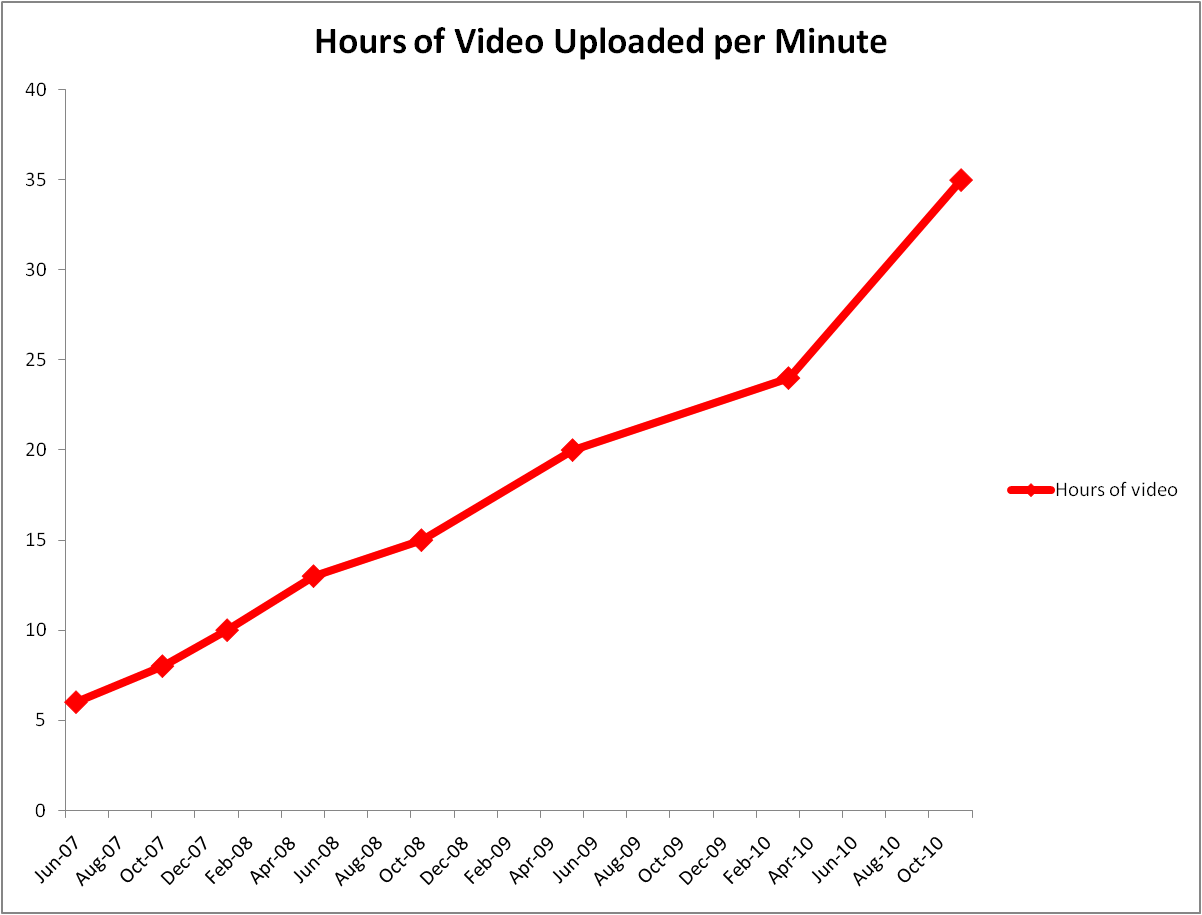
Since the dawn of YouTube, we’ve been sharing the hours of video you upload every minute. In 2007 we started at six hours, then in 2010 we were at 24 hours, then 35, then 48, and now...60 hours of video every minute, an increase of more than 25 percent in the last eight months. In other words, you’re uploading one hour of video to YouTube every second. Tick, tock, tick, tock — that’s 4 hours right there!

In the past we’ve made charts and infographics to describe the kind of mind-boggling engagement you’re driving, and this time we let our dataheads run wild. They came back to us with onehourpersecond.com — an interactive collection of what happens in a YouTube second. Here’s a sample:


For all the hours of video you’re uploading—you’re watching more as well; we’ve now exceeded four billion video views globally every day. That’s up 30 percent in the last eight months and the equivalent of more than half the world’s population watching a video every day, the same number as there are US $1 bills in circulation, the same as number of years since there was water on Mars...it’s a big number, and you’re making it bigger every day.

With more original Channels rolling out this year, a new homepage to help you find and follow Channels you love, and new tools for creators always on the horizon, we’re excited to see how many times you’ll grow these numbers this year!

The YouTube Team recently watched “The Joy of Books.”

Minggu, 22 Januari 2012

A Look Back as We Move Forward: YouTube Product Launches in 2011

We checked the calendar, and it looks like we’re just in time for the last acceptable moment for a 2011 re-cap post. From the zany to the educational, our engineering and product teams launched tons of features to make YouTube an even better place for both viewers and creators. Let’s look back at some of these:

We launched features to improve the viewing experience for the 800 million of you who visit YouTube each month, like:

  • A New Homepage and Design: Launched in December to help you to get more into the great content you love, with a customizable YouTube Channels line-up and feed of the latest activity and videos from your subscriptions.
  • YouTube Original Channels: Original Channels from well-known personalities from the TV, film, news, sports and other fields, to up-and-coming media companies, to some of YouTube’s existing partners. Full line-up here.
  • YouTube Politics: As we’re now in an election year in the United States, this Channel is your one-stop-shop to follow the latest political stories, connect with the candidates and keep your finger on the political pulse of the nation.
  • YouTube Rentals: From new releases to all-time classics, thousands of full-length films from major Hollywood studios are available to rent in the US, UK, Canada and Japan at youtube.com/movies.  
  • YouTube Slam: Born on TestTube, this video discovery experiment was cooked up with folks from Google Research. Each week a new crop of videos battles head-to-head in Comedy, Cute, Music, Bizarre and Dance Slams, where your votes determine who wins the Slam and gets featured on the leaderboard.
Every minute, 48 hours of videos are uploaded to YouTube, so we’re always working to help you make your videos the best they can be:

  • YouTube Editor: The Editor team was busy in 2011, launching image stabilization for smoother videos, the Edit Video button for one-click video editing and enhancements, and including Creative Commons licenses building a library of millions of CC tagged videos.  
  • YouTube Analytics: We love data, so we added even more features to help you examine and grow your audience through more detailed reporting.
  • More opportunities to make money from videos: We're also helping more uploaders make money from their videos. You might have noticed a button saying "Make money on your videos" last time you logged in to your YouTube account, which you might see if your account is in good standing and you’ve been adhering to our Community Guidelines. If you opt in, ads might run on your videos and you could start earning revenue. We've made this feature available to many account holders in the U.S. already, and over the coming months we'll be making it available to more people around the world.
  • YouTube.com/Create: No camera? No problem. With partners like Magisto, Vlix, GoAnimate and others, you can still create animated and personal videos to upload directly to YouTube.
With new features coming out every week, these examples are just a few of the launches in 2011. So, we also want to hear from you. What was your favorite YouTube product launch of 2011? Let us know by leaving a comment on the +YouTube page.

John Harding, Engineering Director, Recently Watched Teahupoo from the Phantom HD Camera.

Kamis, 01 Desember 2011

Get more into what you love on YouTube with our new look

From your favorite sports highlights and dance competitions to make-up tutorials, science experiments and great movies, there’s a ton of great stuff on YouTube — over three billion views worth per day by last count. More and more, behind every great video is a great Channel, and with our announcement last month that more of them are coming to YouTube, we want to make it easier for you to find and keep tabs of what you want to watch.

So, today we're introducing a new homepage, Channel design and a fresh coat of digital paint. Here are three ways these updates will improve your life on YouTube:

1. A new homepage
The YouTube homepage is your gateway to a vast entertainment universe. To help you get more into YouTube, we’re making it easier to find and follow great Channels when you arrive. On the left side of the homepage you can create your own, personal, customizable YouTube Channel line-up. Sign-in, or create a YouTube account. Then you can browse recommended Channels; customize your homepage’s feed; even link your YouTube account to Google+ and Facebook to see what your friends are sharing. The new homepage feed we launched earlier this year is now front and center on the homepage. You can switch between feeds by clicking on different Channels on the left.

For step by step instructions on using the new YouTube homepage, you can go to our help center.

2. Simpler, customizable Channels
Given the homepage’s new focus on helping you find and organize your favorite Channels, we would be remiss if we didn’t update the look and feel of the Channels themselves. Today we're launching an improved Channel design focused on what matters most: helping users find great videos. As different uploaders have different goals, we've created new Channel templates to meet your needs whether you produce one video a week or have thousands of videos for a fan to browse. Some partners have even uploaded videos talking about the features, or giving tips on how they’re taking advantage of the new design. To learn how to opt-in to and test this new Channel design, check out our help center.

3. A new overall design
To bring the new homepage and Channels designs together we’ve also applied a fresh coat of digital paint across the whole site. In July, we unveiled an experimental design called Cosmic Panda. We’ve used your feedback to improve our overall design, and today, we’re presenting a cleaner and simpler YouTube, with a consistent gray background, bigger video thumbnails and a more streamlined watch page.

Ready to get started? Your new YouTube is already shipped and waiting for you at YouTube.com, and like every new toy, we included an instruction manual (and video) to help.


Our recent Channels expansion, our grants and educational programs, and this new design are all focused on helping you discover a broader range of entertainment on YouTube. We’re always innovating and testing new stuff out to make the experience the best it can be for you. We rely on your feedback to figure out when we've gotten it right and when it needs further tweaks. So let us know what you think.

The YouTube team

Sabtu, 30 Oktober 2010

Release Notes: Community-designed Doodle, global Halloween films, easier bug reporting, virtual keyboard...

With it being Halloween season and all, we've got an especially spoooooky edition of Release Notes for you.

First-ever user-designed Doodle:
You may have noticed that once in a while, we change our homepage logo to match a special occasion -- for example, we've done it for Earth Day, the finale of YouTube Play, and yesterday's one billionth subscription milestone. But this Halloween we're especially jazzed because the Doodle you'll see on the homepage was designed by xperpetualmotion, a YouTube community member and Rhode Island School of Design student. Here's how she came up with the icon you see below: "I tried out a lot of different Halloween imagery before deciding on the classic 'holes cut out of a white sheet' ghost. It makes me smile every time, because what else could this kid possibly have under there that makes him that shape? I wanted the logo to be something fun and clever, and I hope everyone loves it as much as I do!" We certainly do! Thank you, Karen.

YouTube's first user-designed Doodle, by xperpetualmotion

Global Halloween films: If you're in the U.S., U.K., Canada or Australia, we've got some exciting news to add to your seasonal mirth: our friends at Crackle made sure their Halloween offerings could be viewed by horror fans around the world, marking the first time a studio's made several full-length movies simultaneously available in multiple territories on YouTube. Click here for regional viewing dates for Underworld: Evolution, Idle Hands, Mary Reilly, The Blob and The Bride.

Report a bug: No, we don't mean the creepy crawly kind, but the kind that may indicate something's broken. If you come across a problem on the site, scroll down to the new "report a bug" link at the bottom of any YouTube page. Clicking it will allow you to take an easy screenshot of the page and add further details in the pop-up box:

New "Send feedback" form

African language launches: YouTube's now available in Amharic and Swahili. Click on the language link at the bottom of the page to change your language settings.

Type non-English text with the virtual keyboard: We've made it easy for people to find videos in non-Latin script-based languages; the on-screen keyboard is available in 26 languages (Amharic, Arabic, Bulgarian, Croatian, Czech, Danish, Dutch, Filipino, Finnish, Greek, Hebrew, Hindi, Korean, Lithuanian, Norwegian, Polish, Portuguese, Russian, Serbian, Slovak, Swahili, Swedish, Vietnamese, Slovenian, Romanian, Ukrainian). To use the virtual keyboard, switch the language of the site to one of the supported languages and click on the keyboard icon in the search box.

Here's where you can turn on the virtual keyboard

More efficient 3D player: Our new player for 3D videos is much faster than the previous player, especially for HD resolution. Try enjoying your favorite 3D clips in high resolution and full screen with no lag.

The BooooooTube Team

UPDATE (8pm PT):  We just received this video from Karen, to go along with her Doodle:

Rabu, 08 September 2010

YouTube launches in Argentina

Today, Argentina becomes the 25th country to get its own version of YouTube. This means that Argentines will be able to more easily discover local talent like GuadalajaraMan, UESiglo21, farolatino, casiangeles or yoteloexplico, as well as view the most popular and most viewed videos in their country.

To experience the new site, head to the bottom of the page, click on the ‘Location’ tab, and select Argentina from the menu:


We’re also teaming up with local broadcasters to ensure that YouTube viewers, wherever you may be, can watch some of the best news, sports and public television videos being made in Argentina today. Such partners include Encuentro, America TV, Boca Juniors and TV Pública. Other Argentine video-makers can apply for partnership at www.youtube.com/partners.

We look forward to working with everyone in Argentina to make the YouTube community even bigger and brighter than it is today.
Ricardo Blanco, Communications Manager, Latin America, and Brian Truong, Product Manager, recently watched “Otakus with English Subtitles.”

Rabu, 18 Agustus 2010

Off the Charts

What’s the latest in the all-time most viewed video smackdown between Bieber and Gaga? Is David After Dentist pwning Charlie Bit My Finger? Who grabbed more subscribers this month, ShayCarl or Annoying Orange?

These are the big questions on the lips of the YouTube community. To help answer them, we're launching “YouTube Charts” to give you a clear view of how your favorite videos and creators stack up against each other. You can sort charts by “today,” “this week” and “all time.”


We’d love to hear your suggestions on which charts you’d like to see. Best newcomer? Most shared video? Fastest to a million views? Let us know right here, in the forum discussion on this topic.

Matt Darby, Product Manager, recently watched “Hot Chip - I Feel Better.”

Jumat, 06 Agustus 2010

Release Notes: Playlist Bar, music listings, annotations upgrades...

What's new on YouTube since we last met? Let us count the things...

"Playlist Bar" launch: Last week, we introduced the "Playlist Bar": when you view a playlist, recommended videos (from the homepage), your subscriptions or your favorites, you'll see a control bar at the bottom of the page, displaying the videos from those categories. The goal is to keep you from having to jumping back and forth to different pages to select which videos you'd like to watch next. Autoplay (which is no longer on by default) and the ability to select specific videos from your playlists without ever leaving the page are intended to make your viewing experience more seamless. We're continuing to monitor your feedback here as we plan improvements to this feature.

Local music listings: A new addition to our revamped music page is the "Events Near You" section, provided by Songkick. Discover an artist you like on the page? "Events Near You" will let you know if he or she is headed your way.


Annotations upgrades: We now offer fully transparent annotations with black or white text, a new default color (half-transparent black, replacing red), a new default position for new annotations (off-center), and a cleaner look for tooltips.

Redesigned video manager: The My_Videos page has been reworked to offer streamlined ways of managing and reviewing videos you've uploaded, including options to sort your videos alphabetically, by length, by recency and by views. You can also browse the content you've viewed, purchased and liked, and there's access right here to Insight and Promoted Videos information (to the right of "Edit" button). For feedback on these changes, please chime in here.

Promotional badges: Take a look at the badges created to help you better promote your YouTube channel on site and off. Find the asset you like and click on it to generate handy embed code for your blog or website (you'll have to sign in at the prompt).

New way to embed videos: A new embed code style enables you to view embedded videos in one of our Flash or HTML5 players, depending on your viewing environment and preferences. For more information, see this blog post from our API blog.

Buzz videos on your homepage: As with the Facebook feed import, the YouTube videos your friends are sharing on Google Buzz are now be pulled into your YouTube homepage if you're connected to Buzz (e.g. to AutoShare your activity).

HQ Webcam uploads: That's right: You can now upload high quality video from your Webcam! All webcam recordings will be done at 360p.

Free previews on rentals: All rental videos in the U.S. will show a free preview or movie trailer automatically so you can decide if you want to watch it before buying it. If you're over 18 and live in the U.S., you can check this out right here on the movie Kick-Ass.

The YouTube Team

Kamis, 29 Juli 2010

Upload limit increases to 15 minutes for all users

We want YouTube to be the best place to upload video. Without question, the number one requested feature by our creators is to upload videos longer than 10 minutes. We’ve heard you, and today we’re pleased to announce that we’ve increased the upload limit to 15 minutes.

We encourage you to take full advantage of this new time limit by making a video of your “15 minutes of fame.” Imagine that this video is all the world will ever know about you: what would you want to communicate? What will be the enduring stamp you’ve left on us all? Tag your video with “yt15minutes,” upload it by Wednesday, August 4, and we’ll select a handful of people to truly gain their 15 minutes of fame by featuring them on the YouTube homepage in a future spotlight.

In the meantime, you may wonder “why now?” -- the upload limit for non-partners has been 10 minutes for years. Well, we’ve spent significant resources on creating and improving our state-of-the-art Content ID system and many other powerful tools for copyright owners. Now, all of the major U.S. movie studios, music labels and over 1,000 other global partners use Content ID to manage their content on YouTube. Because of the success of these ongoing technological efforts, we are able to increase the upload limit today. We will continue our strong commitment to provide advanced technology and tools to protect the rights of small and large copyright owners worldwide. We’ll also do everything we can to release incremental improvements like this one that benefit our video creators.

One final note: if you’re uploading a video that was previously rejected for being too long, you’ll have to go into “My Videos” and delete it before attempting to upload it again. Thanks and happy uploading!

Joshua Siegel, Product Manager, Upload and Video Management, recently watched "Gulf - Jack Conte VideoSong."

Jumat, 02 Juli 2010

Release Notes: processing status, share to Buzz, and more

Before we head into the holiday weekend, wanted to update you on a couple of things that went down in sunny San Bruno recently:

Processing progress status: Those of you who upload know that there's a short period of time between uploading a video and it being visible on the site. The new processing percentage under the video preview lets you know when your video is ready for the world to see.

AutoShare to Buzz: Over four million people are already AutoSharing to Facebook, Twitter, Orkut or Google Reader, and now you can automatically share your YouTube likes, favorites, comments, subscriptions and uploads to your Buzz network, too. You can still keep YouTube as a connected site in Buzz if you hooked it up previously, but that only automatically posts your uploads for now. For more about AutoShare, click here.

Results badging: Our search results page has had a light makeover. Instead of bold headers separating channels, videos and playlist results, we've introduced new, compact badges to more clearly indicate the content type, as so:

New captions feature: The interactive captions viewer allows people to read ahead in the caption stream and jump to a specific segment within a video with captions. Captions are a key part of making YouTube accessible to all.


Have a great one!

The YouTube Team

Jumat, 30 April 2010

Release notes: five new languages, email alerts, share to Buzz and Blogger

What better way to celebrate the weekend than with these recent adds and enhancements:

Language offering grows: There are five new languages in which YouTube can be experienced: Greek, Hungarian, Finnish, Danish and Norwegian. Simply scroll to the bottom of any page, find where it says "Language" and click on your current language to access the full menu of options, including our five most recent additions:


Email alerts: We're experimenting with a new form of subscription alerts. Now, when you subscribe to a channel (or edit your subscription to an existing channel), you can elect to receive an email the instant the person you're subscribed to uploads a new video. This will appeal to people who check their email more frequently than they log in to YouTube (though we've never heard of such people *wink*) but who also want to know immediately when their favorite content creators upload new work.

Refreshed look for search results page: When you do a search, you'll see we tightened up the typography on the results page. We're using a consistent size and color to establish the basic look, and then we're adding a bit of color and bolding to bring more prominence to certain elements, such as view count. 


New sharing options: Click the "share" button underneath any video and you'll see two new platforms to effortlessly share videos to: Google Buzz and Blogger. Try it!


New upload interface: When you click on the Upload button, you may notice that things look a little different. As with our redesigned video page and as part of our larger "spring cleaning" effort, a main goal was to streamline the look and functionality of the upload page. We toned down some of the colors and moved the Webcam option to a more prominent position next to the upload button. We also made it easier to find information about how to upload directly from your mobile phone.

Player changes: As many of you have noticed, the video player is transforming, too. We've just fully released a new player design for all videos without ads. The goal is for the player to be as subtle as possible so that the video itself shines and doesn't have to compete with the stuff around it. We'll be following this roll-out with player upgrades for videos with ads and then for embedded videos.

Improvements to YouTube-on-iPad: There's a great native YouTube app on the iPad, but we've also made some changes to how the YouTube website functions on the device. Among the improvements: we created a grid layout for the home screen, search results and other video lists, and devised a new layout for the video page, with the video playing right in the page.

The YouTube Team

Rabu, 31 Maret 2010

TEXTp saves YouTube bandwidth, money

It’s great news that there are 24 hours of video uploaded to YouTube every minute, we support 1080p and HD uploads are rising quickly, but that’s also meant increasing bandwidth costs cutting into our bottom line. And so, in our drive to keep expenses under control, we’ve decided that April 1 is the perfect day to take the important step of offering a new way to experience YouTube: text-only mode, or TEXTp.

TEXTp is the result of months of intense transcoding efforts by our engineers, who toiled for weeks to ensure that a large chunk of videos on the platform could be reduced to their most basic elements. By replacing the images in the video with a series of letters and numbers, the videos are far less taxing on our system -- and have the added benefit of promoting literacy!

To give it a whirl, make sure you have the latest Flash player (10.0) and click here. Or you can select “TEXTp” from the pulldown menu on most videos, as so:


You can also append &textp=fool to most video URLs to test it out.

For every person who selects TEXTp and keeps it on while you watch a video, you save YouTube $1 a second, resulting in potentially billions of dollars of savings for us. So if you care about YouTube, you’ll use TEXTp today.

Patrick Pichette, SVP and Chief Financial Officer, Google

New video page launches for all users

As you may know, we're in the midst of one of the largest redesigns in YouTube's history: we're simplifying the look and functionality of the video page. That's the page you see whenever a video plays, and this redesign is about going "back to basics," focusing attention on the reason why you came to YouTube in the first place -- the video -- and all the ways you engage with content and creators.

We first unveiled the new video page two months ago and checked in four weeks later to tell you about the latest set of changes. Truth is, we've been thinking about this for a long time: what you see is the result of eight months' worth of user research, feedback and data analysis. Now, after a few more additions based on your latest feedback, we are rolling it out to 100% of YouTube users.

Here's what's new about the page:

Overall look and functionality
- It's cleaner, simpler and easier to use.
- Information about a video is now grouped together in one place and there's a consistent way to get more detail when you need it. This way, unless something's truly useful to you, it doesn't clutter up your page.
- We've cleaned up the actions bar; you'll see a streamlined presentation for sharing, flagging, and embedding controls.

Discovery
- The right-hand side of the page is devoted to the next video to watch. We're smarter about suggesting the next videos to watch based on how you found the video you're watching in the first place.
- The channel name and subscribe button are now both on top of the video. We found that you prefer having a quick peek at more videos uploaders have created before deciding whether to subscribe to their channels.

Playlists
- There's a new playlist interface, with the next video in the list appearing consistently in the top right. You can easily expand that list or skip ahead using a new next button in the player controls.
- Saving to playlists is easier, and we've made Favorites the default option.

Ratings
- We've replaced the five-star ratings system with a simpler "likes / dislikes" model and introduced a new "Videos I Liked" list.

Comments
- Comments have a new highlights view which summarizes the best discussions and celebrates when creators communicate with their audiences.

We know this is a big change, but we hope you'll find the new page to be an improvement to your YouTube experience and to be a reflection of what you've told us thus far through your usage of the site and your comments to us. We'll be gathering in a conference room at our San Bruno, CA, headquarters at 6 p.m. PT today and tomorrow, and in London at 9 a.m. GMT tomorrow, to respond in near-real-time to your comments in the forums, on this blog and on Twitter. Of course, we'll be listening at other times, too, but we wanted to make sure we were available when you might have the most questions about these changes.

Igor Kofman, Software Engineer, recently watched "Pantyraid - Beba," and Shiva Rajaraman, Product Manager, recently watched "Chat Roulette Funny Piano Improv #2."

Sabtu, 27 Maret 2010

Release notes: Facebook Connect, real-time sharing, subscriber stats

In addition to some changes to our new video page, which we reported in a separate post, here are some things that have launched recently:

Invitation to Facebook Connect: You've been able to connect your YouTube account to your Facebook account for a while now in order to AutoShare or to find friends to subscribe to. Less known is that the YouTube homepage can show you the YouTube videos your friends are sharing on Facebook; we've kept this under the radar while we've ramped up support. But now, when you log in to your YouTube account, you'll get a prominent invitation in the Recent Activity module (see below) to connect to Facebook, which we highly recommend that you do. In fact, we hope to integrate more social networks with YouTube going forward: knowing which videos your friends are sharing on social platforms is one of the best ways to discover those clips that you, in turn, just might feel compelled to pass along. That's how we found this gem, a lovely virtual choir.


Real-time sharing: AutoShare lets you effortlessly share videos from YouTube to Twitter, Facebook or Google Reader. What you might not have known is that until recently, it took about 10 minutes for those items to get pushed out from YouTube to these platforms. Now these actions happen instantly, in real time.

Partner Program expands again: Exciting! Users in Israel and Mexico can now become members of the YouTube Partner Program (YPP). To sign up, click here.

Subscribers tab in Insight: The number of subscribers you have is an important metric for many YouTube users, as it indicates how many people love your videos so much that they want to be sure never to miss one. (Speaking of which, we commend Nigahiga, who recently hit 2 million subscribers to become YouTube's No. 1 most subscribed channel of all time. But, we digress.) Insight, YouTube's analytics tool, recently added data about the evolution of your subscriber numbers over time, broken down into new subscriptions and unsubscriptions per day. Head over to your account's Insight area to check it out.

Planning our April Fool's Day joke: What joke? :) We just wanted to see if you were reading this far.

The YouTube Team

Kamis, 25 Maret 2010

New video page adds comments highlight view and ratings improvements

Over the past couple of weeks, we've been busy iterating on the new video page design based on your feedback, and we're excited to share some new developments before the page is rolled out to everyone soon. Remember to opt-in here to get a preview of these new features:

Highlights view on comments
Many of you indicated that comments could use an overhaul and hoped that was a part of the redesign. We're happy to say that it is. Today, we're introducing a "highlights view" of comments which summarizes top rated comments, uploader comments, video responses and recent comments in a single "front-page story" that you can drill into for more detail. You can see an example on this video and this one. We're continuing to make the highlights better as we learn how people interact with it, so please let us know what you think in the comments below.

Ratings
We've also made some improvements to the new like/dislike ratings system. When you like a video, we let you know how many people liked it and disliked it. To help you remember the best videos you've encountered, there's a new area housing all the videos that you liked, called (surprise, surprise) "Videos I Liked." In addition, we listened to your feedback and no longer tie 'Liking' something to your Favorites, which you use more for personal saving. Favoriting a video is now the first option when you click "save"; you can continue to save videos to your Favorites in this manner or create another playlist just by typing in the name. Finally, throughout the site, you'll occasionally see a video marked 'Most Liked' to give you an indication that this is a video other people loved, that you may want to check out. We surface popular videos in many ways, and we hope Most Liked becomes a reliable signal that helps you find quality videos to watch.

For quick refresher on the overall video page design, check out this video produced by TheWillofDC:


And if you've opted in but want to go back to the old page, you can opt out here.

UPDATE: After reading your comments, we'd like to note that some of you are opted in permanently to the new page, which means you are part of our current experiment and are unable to opt out. These kinds of experiments help us learn what works on the page and what doesn't, so that we can build the best possible site for you. We've also heard your feedback on Auto-play interrupting your experience and are working on some improvements.

Peter Bradshaw, Software Engineer, recently liked "SOIL & "PIMP" SESSIONS 'Summer Goddess'," and Tyler Morse, Software Engineer, recently liked "Bottle Bank Arcade - TheFunTheory.com - Rolighetsteorin.se." 

Kamis, 04 Maret 2010

New Default Size for Embedded Videos

A video's life on YouTube is just the beginning; embedding gives it a life off of the site. Just look at your favorite blogger and they're likely to be embedding YouTube content in their posts. In fact, almost every popular video on the site is first made famous by embeds on the Web. That number can be as high as 50% of views in the first 48 hours, kicking off a great cycle.

We offer a few size choices when you grab a video's embed code. The default size used to be on the smaller side -- smaller than the size displayed on YouTube.com -- but as of today, we're defaulting to a larger size, one that's the same size of a video on YouTube.com (either 480x385 if 4:3 video, or 640x385 for 16:9 content). These new defaults were selected because they will give the majority of people the best possible viewing experience and because they better match our current video encoding sizes.

When you click on the embed code, the space below it will expand and reveal customization options, like so:


You can choose the following for your embedded player:
  • The color and size
  • Whether or not to include related videos
  • Whether or not to display the player border
  • Whether or not to play in HD by default -- triggers video resolutions of 1280x720 (720p) or 1920x1080 (1080p)
When using the "Play in HD" option, it's best to embed the player at a very large size (at least 1280x745) in order to accommodate the large size of the video. If you play HD video in a small player, the user's computer will have to scale down the video to fit within the player, costing the user extra CPU cycles and bandwidth, which may result in choppy playback. It's always best to play the video size that best fits the size of the video player. And if you want even better performance when watching HD content, you can choose to watch it in full-screen.

Geoff Stearns, Senior Web Developer, recently embedded "OK Go - This Too Shall Pass - RGM version."

Kamis, 25 Februari 2010

Latest Changes to Video Page: New Playlist Experience, Integrated Comments & More

The video page overhaul that's underway now is one of the biggest redesigns in YouTube history. It's been a month since we offered a sneak peek of the new look and functionality, and in that time we've been gathering your feedback, looking at data, and tweaking elements to ensure that the page is as clean and useful as it can be. Here's what's changed since our last post on the topic:

New playlist interface: We've introduced a new playlist design and introduced an AutoPlay On/Off switch that controls whether you automatically go to the next video or not. When we have a robust set of videos for you to watch next, we'll default you into AutoPlay mode but you can turn it off easily.


Queue comes to search: When you search from the video page, you can now add videos to your queue. Many of you have indicated you enjoy watching and programming your 'next up' experience, so we've made it easier.

Integrated comments: The comments section now lists both text and video responses, bringing together the whole spectrum of conversation going on around a video. We'll be touching this up quite a bit in the coming weeks so keep an eye on this area and give us feedback.

We've got a bit more work to do before we'll roll this out more widely; right now, only a small percentage of users are testing the page. Until then, keep the suggestions coming by dropping a comment on this blog post or popping by our forum topic on the matter.

As always, you can opt-in to the watch page by clicking on this link. (To revert back to the old video page, use the opt-out link at the top of the new video page or opt out here.)

Shiva Rajaraman, Product Manager, recently watched "TIK TOK KESHA Parody: Glitter Puke - Key of Awe$ome #13."

Jumat, 19 Februari 2010

Release Notes: Nonprofit Program, Private Sharing, Streams

News from the YouTube universe...  
Nonprofit program launches in Australia and Canada: Like their American and British cohorts, nonprofits in Australia and Canada can now apply to become part of the YouTube Nonprofit Program. Members receive free branded channels, custom thumbnails, longer video uploads, and call-to-action overlays. For more information, and to apply, please go to www.youtube.com/nonprofits.

Easier private video sharing: You no longer need to be friends with someone in order to share a private video with them. You can either generate a special URL that up to 25 people can click on, or select the "Private share with YouTube users" option on the video's details page and write in the username(s), separated by a comma, with whom you'd like to share (see screenshot below). After you click "send," the recipient will see the video in his or her inbox.  


Streams retired: Streams was an experimental product launched in TestTube, our ideas incubator, three years ago. We know some of you enjoyed watching videos while chatting with other users, but we've not been able to give Streams the time and attention needed to make it a more mainstream offering. Thus, we've decided to retire it for now as part of our pre-spring cleaning effort, though we hope to build other features that make it easier for you to share and talk about videos with friends.  

Spotlight enhancements: The homepage spotlight is a periodic module featuring thematic or timely content selected by YouTube. (If you don't see it on your homepage, add it here.) Used to be we *had* to feature four videos and a channel in the module. But now we have a lot more flexibility: we can spotlight just one video, as we might in a breaking news situation, or multiple videos rotating randomly every time the page refreshes, as we might for a guest curatorship or spotlight featuring many contest entries. This might be hardly noticeable to you, but we're excited about the programming possibilities this change brings.  

The YouTube Team

Selasa, 16 Februari 2010

2,996 Entries for First Product Ideas Survey

We recently wrapped up our first Product Ideas series, where you let us know which features you wish we'd launch, what we could improve, maybe even what the site would be better without. Over a period of four weeks, 26,563 people offered 2,996 ideas, and those ideas received 321,541 votes. We responded to many of the most popular ideas and launched a few features that directly addressed some of your requests -- namely, an HTML5 Beta (there were many HTML5 advocates who participated) and a sneak peek of our new cleaner video page (some desired a "less cluttered" YouTube). In fact, it was great to see the feedback from people as interested in the idea of de-cluttering the site as we are. This is a 2010 theme for us, and recent changes to the home- and video page, as well as our renewed effort to streamline comments, reflect this.

We will launch another Product Ideas series later this year; until then, feel free to comment below if you've got requests or feedback, and stay tuned to this blog for product announcements.

Mia Quagliarello, Community Manager, recently watched "Ann Cooper: Reinventing the school lunch."

Kamis, 11 Februari 2010

Speed Matters: Introducing the YouTube Video Speed Dashboard

Your YouTube video speed can mean the difference between a fast and fun video viewing experience, or a slow and frustrating one. That's why, today, we're launching a YouTube video speed dashboard to make the speed information available to you.

YouTube video speed depends on many different factors some of which are the speed of your Internet connection, the Internet Service Provider (ISP) you are using and the distance to the video servers. The goal with this dashboard is to give you insight into what your YouTube speed looks like compared to the YouTube speed of users in other regions and different ISPs. We may also list the YouTube speeds for users in you neighborhood but with different ISPs. The speed numbers are calculated by measuring the speed at which YouTube video is received by the browser. This is then averaged over the previous 30 days provided you've used the same browser during this time period.


So, what can you do with all of this new data about your video speed? Well, that's entirely up to you. Some users will find it interesting to compare their city's average YouTube speed with the rest of the world's. Some will discover they're running at slower speeds compared to other users with the same ISP. A higher YouTube video speed translates to a better and faster experience not just for YouTube videos but for the Web in general; and by making this speed data available to users we would like to continue our ongoing efforts to make the web faster.

If you're interested in checking this feature out, go to http://youtube.com/my_speed and see just how fast your YouTube video speed is. Let us know what you think in the comment section below.

Kevin Carle, Engineer, recently watched "Charlie Brooker - How To Report The News," and Arvind Jain, Engineering Director, recently watched "Google's Experimental Fiber Network."